
Account planning lives or dies inside your CRM. If your reps have to leave Salesforce to build a plan, map an org chart, or track white space, the plan becomes a document nobody updates. That is the single biggest reason account planning initiatives fail. The plan ends up in a slide deck reviewed once a quarter, disconnected from the opportunities and activities that actually drive revenue.
The market has responded with a category of Salesforce account planning apps that embed planning directly into the CRM. Some are fully native, built on the Salesforce platform and installed from the AppExchange, so the data never leaves your org. Others are connected apps that sync data back and forth, which introduces latency, security review overhead, and another login. The distinction matters more than most buyers realize when they start their search.
This guide compares the best Salesforce account planning apps for enterprise B2B revenue teams. We cover Prolifiq CRUSH, Altify, DemandFarm, ARPEDIO, Revegy, and Kapta. We look at architecture, key features, vertical fit, pricing benchmarks, and the criteria that separate a tool your reps actually use from shelfware. If you are evaluating vendors for a 2026 rollout, or trying to fix a planning process that stalled, this is the breakdown you need before you sit through five demos that all look the same. Before you compare apps, it is worth being clear on what Salesforce account planning involves and what the native feature already covers. If you want a wider category view, see our guide to the best account planning software. These are the apps that most often make AppExchange shortlists for enterprise account planning.
Why Salesforce Native Matters for Account Planning
There are two architectural models in this market. Native apps are built on the Salesforce platform itself, using Salesforce objects, security, and reporting. Connected apps run on their own infrastructure and sync data into Salesforce through the API.
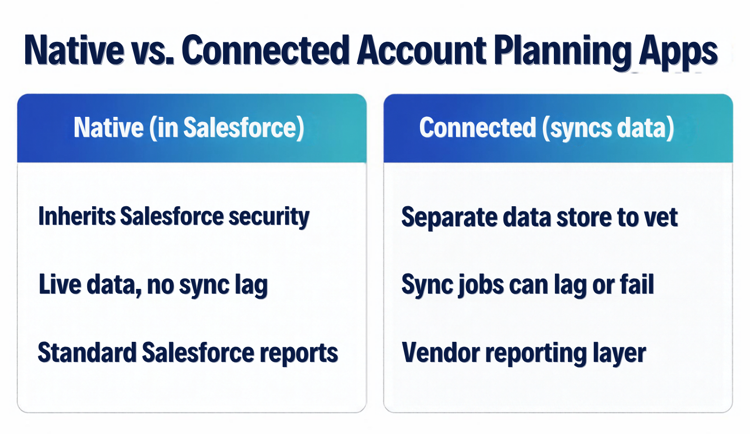
The difference shows up in three places. First, security. A native app inherits your existing Salesforce permission model, sharing rules, and field level security. There is no separate data store to vet, no second SOC 2 review, no customer account data sitting in a vendor cloud. For life sciences and financial services teams under strict compliance, this collapses the procurement timeline from months to weeks.
Second, data freshness. Native apps read and write live Salesforce records. When a rep updates an opportunity, the account plan reflects it instantly because they are the same data. Connected apps depend on sync jobs that can lag, fail, or create duplicate records that confuse reporting.
Third, reporting. Because native apps store plan data in Salesforce objects, your existing dashboards, reports, and analytics tools work against them with no extra integration. You can build a white space report or a relationship coverage report in standard Salesforce reporting. With connected apps, you are often locked into the vendor's reporting layer.
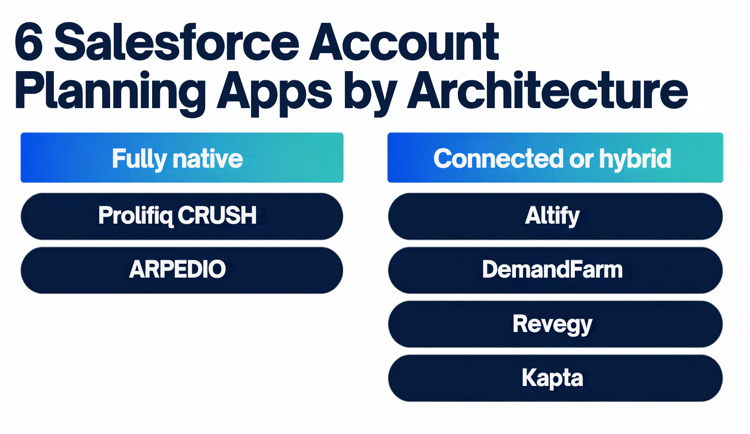
Prolifiq CRUSH and ARPEDIO are fully native. DemandFarm and Altify offer Salesforce integration with varying degrees of nativeness. This is the first filter you should apply. For more on the architecture, see why being native on Salesforce matters.
The Best Salesforce Account Planning Apps Compared
Below are six Salesforce account planning apps and tools, starting with Prolifiq CRUSH. Each entry covers what the app does, who it fits, and where the tradeoffs sit, so you can shortlist before you book demos.
Prolifiq CRUSH
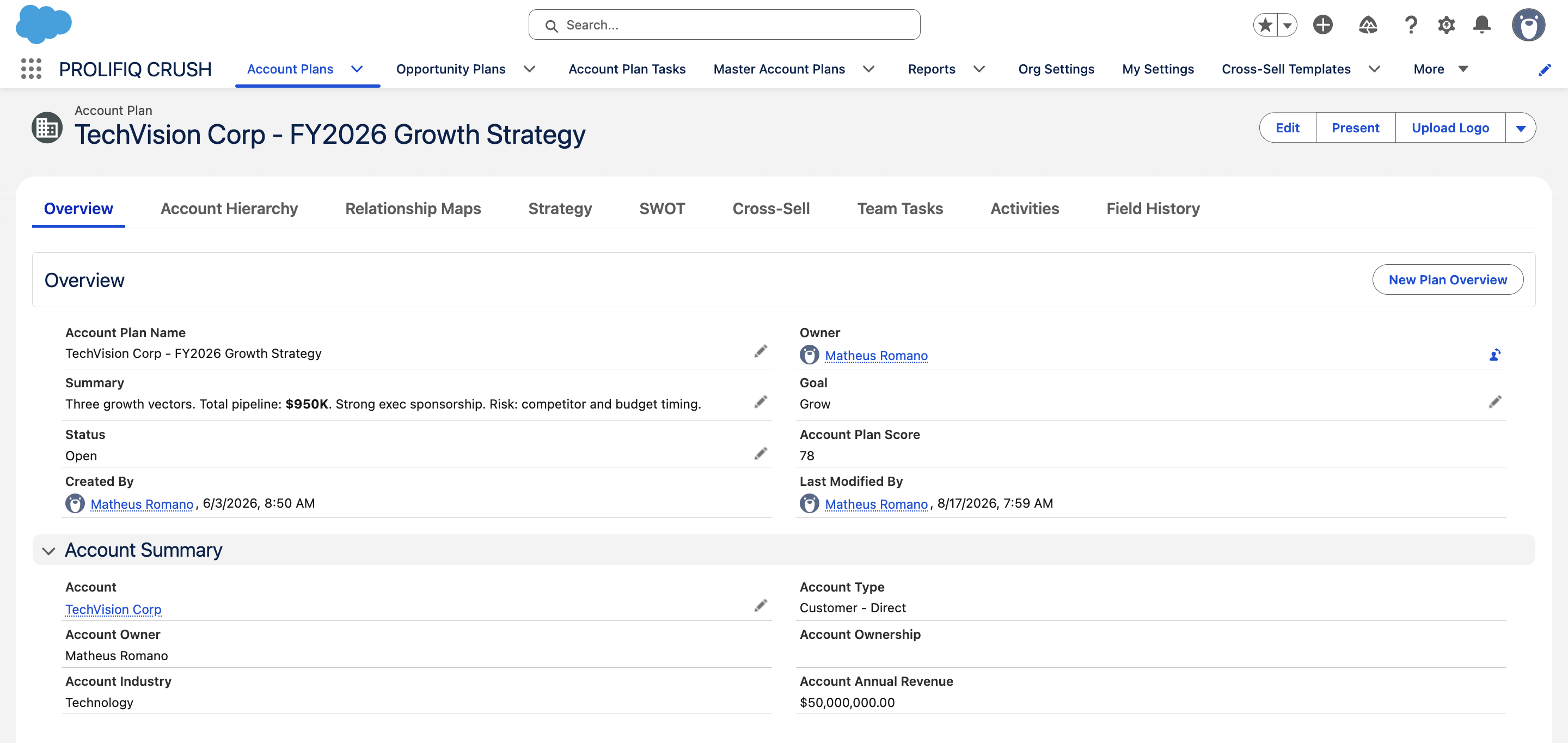
CRUSH is a 100 percent Salesforce-native account planning application. Everything lives inside your Salesforce org, which means there is no external data store, no separate login, and no sync lag. For Salesforce-centric organizations, this is the defining advantage.
Core capabilities
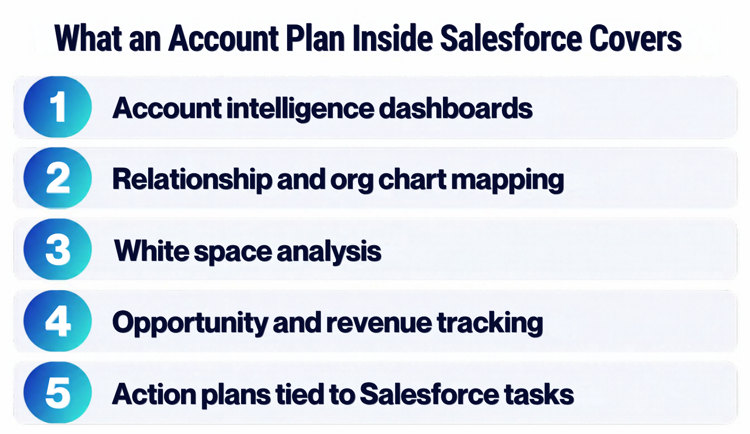
CRUSH covers the full account planning workflow: account intelligence dashboards, relationship and org chart mapping, white space analysis to surface cross sell and upsell, opportunity and revenue tracking, and collaborative action planning tied directly to Salesforce tasks and activities. Because it is native, every element of the plan connects to live records. A white space grid reflects actual closed deals. An org chart links to real contact records. Action items become real Salesforce tasks that show up in rep workflows.
Who it fits
CRUSH is strongest for enterprise B2B teams that have standardized on Salesforce and want planning to be part of the system reps already live in, not a parallel tool. It has particular traction in life sciences, financial services, manufacturing, and technology, where complex buying committees and multi year account relationships make structured planning essential. Teams that pair CRUSH with ACE, Prolifiq's native sales enablement and content product, get planning and content surfaced in the same Salesforce experience.
The adoption advantage is real: when the plan is in the CRM and updates itself from CRM data, reps maintain it because it requires no double entry.
Altify
Altify, now part of Upland Software, is one of the longest standing names in account planning and opportunity management. It offers relationship mapping, account planning, and opportunity management methodology rooted in years of sales process research.
Strengths and tradeoffs
Altify's methodology depth is its calling card. The relationship map and the structured insight maps guide reps through a defined process, which appeals to organizations that want methodology baked into the tool. It integrates with Salesforce and has a long enterprise track record.
The tradeoffs: Altify is a heavier deployment. The methodology richness can become complexity that slows adoption, and reps sometimes perceive it as a tool built for the sales operations team rather than for daily selling. Pricing sits at the premium end, frequently quoted in the range of 75 to 125 dollars per user per month depending on modules and contract size, and implementations often run 12 to 16 weeks. Since the Upland acquisition, some customers report a shift in roadmap focus. Evaluate whether the methodology overhead matches how your reps actually work.
DemandFarm
DemandFarm focuses specifically on key account management and is built around three modules: Org Chart, Account Planner, and Opportunity Planner. It positions itself heavily for the strategic account and key account management use case.
Strengths and tradeoffs
The org chart and relationship mapping capabilities are well regarded, with strong visualization for complex buying groups. DemandFarm markets a Salesforce-native option alongside a standalone version, so confirm which architecture a given quote covers.
The tradeoffs come down to scope and pricing transparency. DemandFarm is purpose built for large strategic accounts, which is excellent if that is your motion but can feel like overkill for teams managing a broader, lighter book of business. Pricing is typically quoted per user and lands in a similar enterprise range to its peers. Buyers should clarify exactly which modules are included, because the org chart, account plan, and opportunity plan can be licensed separately, which inflates total cost when you need the full picture.
ARPEDIO
ARPEDIO is a Salesforce-native platform covering relationship mapping, account planning, opportunity scoring, and stakeholder management. Like CRUSH, it is built on the Salesforce platform, so it shares the native security and data freshness advantages.
Strengths and tradeoffs
ARPEDIO's relationship and stakeholder mapping is strong, with a clean interface and good visualization. It is a credible native alternative and competes directly with CRUSH on architecture.
The tradeoffs are largely about market presence and vertical depth. ARPEDIO is a European headquartered vendor with a growing North American footprint, so reference availability in specific verticals and regions varies. Evaluate the depth of its white space and revenue tracking against your specific cross sell motion, and confirm support coverage for your time zones if you operate a global team. Pricing is quoted per user per month and is competitive within the native segment.
Revegy
Revegy specializes in account planning, opportunity planning, and relationship mapping with a visual, map driven approach. It targets strategic and enterprise account teams.
Strengths and tradeoffs
Revegy's visual mapping for value and relationships is a long standing strength, and it offers solid Salesforce integration. Teams that think visually about whitespace and stakeholder influence tend to like the interface.
The tradeoffs: Revegy is a connected platform rather than fully native, so the data sync and separate environment considerations apply. As with the other premium vendors, it carries an enterprise price point and a non trivial implementation effort. Confirm how its data integrates with your existing Salesforce reporting before you commit, because reporting flexibility is a common point of friction with non native tools.
Kapta
Kapta focuses on key account management and customer success, emphasizing account plans, voice of customer, and QBR workflows. It is more oriented toward post sale account management and expansion than net new pipeline generation.
Strengths and tradeoffs
Kapta is a good fit for customer success and strategic account management teams that need structured QBRs, success plans, and outcome tracking. Its methodology, built around objectives and goals, suits retention and growth motions.
The tradeoffs: Kapta is less focused on the new business and sales opportunity side of account planning, and it operates as a standalone platform with Salesforce integration rather than a native app. If your primary need is sales account planning inside Salesforce, Kapta solves a slightly different problem. If your need is account management and customer success orchestration, it deserves a look.
Feature Comparison: What Actually Differentiates These Salesforce Account Planning Tools
Strip away the marketing and the meaningful differences cluster around five dimensions.
Architecture
Fully native (CRUSH, ARPEDIO) versus connected or hybrid (Altify, DemandFarm, Revegy, Kapta). Native wins on security, data freshness, and reporting for Salesforce-centric organizations.
White space analysis
The ability to map products purchased against products available across an account hierarchy is where revenue expansion comes from. CRUSH ties white space to live Salesforce product and opportunity data. Evaluate how each tool sources and refreshes this data.
Relationship and org mapping
Every vendor offers this. The question is whether the map links to real Salesforce contact records and updates automatically, or whether reps maintain it by hand. Manual maps go stale within a quarter. See our guides to Salesforce relationship mapping and the best relationship mapping tools for a closer look.
Adoption design
The best tool is the one reps use. Native apps that surface inside existing Salesforce records have a structural adoption advantage over standalone tools that require a separate login and double entry.
Reporting
Can your existing Salesforce dashboards report on plan data, or are you locked into a vendor reporting layer? Native apps store data in Salesforce objects, so standard reporting works.
Pricing Benchmarks for Salesforce Account Planning Apps
Most vendors in this category do not publish pricing, but enterprise buyers can use these benchmarks. Per user per month pricing generally ranges from 40 dollars at the lower end to 125 dollars at the premium end, depending on vendor, modules, and contract size. Altify and DemandFarm tend to sit at the higher end, especially when multiple modules are licensed separately.
Watch for these cost drivers. Modular pricing means the org chart, account plan, and opportunity plan may each carry a separate line item. Minimum seat commitments often start at 25 to 50 users. Implementation and onboarding fees can add 15,000 to 75,000 dollars for enterprise rollouts. Annual contracts are standard, and multi year deals usually unlock meaningful discounts.
Native apps reduce a hidden cost: security and procurement review. Because no customer data leaves Salesforce, a native app like CRUSH typically clears infosec review far faster than a connected platform that requires a separate data processing agreement and SOC 2 evaluation. For regulated industries, that time savings is worth real money.
How to Choose the Right Account Planning App
Start by mapping your actual workflow, not the vendor's feature list. Document how a rep builds and maintains a plan today, where the data comes from, and where the process breaks. Then evaluate tools against that.
Prioritize native architecture if you are Salesforce-centric, especially in regulated verticals. Insist on a proof of concept with your own data, not a canned demo. Run it with five real reps for two weeks and measure whether they update plans without being chased. Adoption is the only metric that matters after go live.
Check reporting against your existing dashboards. Confirm exactly which modules are included in the quoted price. And weigh the implementation timeline against your sales cycle: a 16 week deployment may miss the planning season you bought the tool to support. If you need a starting point for that workflow, use our account planning template.
Map the app to your sales motion
If your goal is new business and pipeline inside strategic accounts, favor strong white space and opportunity planning, which points to Prolifiq CRUSH, Altify, or Revegy. If retention and expansion in existing accounts dominate, Kapta and the relationship-focused tools deserve more weight. If executives consume account strategy visually and often, the visualizations in DemandFarm and ARPEDIO stand out.
Common Mistakes When Buying Account Planning Apps on the AppExchange
The most expensive mistake is buying the most feature-rich platform without confirming that reps will use it. Powerful tools with low adoption produce no return. The second mistake is treating a connected app as native and discovering months later that you are maintaining two permission systems and a fragile sync. The third is underestimating change management for methodology-heavy platforms, then blaming the software when adoption stalls.
Avoid all three by weighting adoption and native architecture heavily in your scorecard, validating native claims by asking exactly how data is stored, and being honest about your organization's appetite for process change before you sign. Use your pilot to measure plan completion, the share of action items that become real Salesforce tasks, and unprompted logins.
FAQ
What is the difference between native and connected Salesforce account planning apps?
Native apps are built on the Salesforce platform and store all data in Salesforce objects, so there is no external data store, no separate login, and no sync lag. Connected apps run on their own infrastructure and sync data through the Salesforce API, which introduces latency, additional security review, and a second environment to maintain. For Salesforce-centric and regulated organizations, native is generally the safer and faster choice.
Which account planning app has the best Salesforce integration?
Fully native apps like Prolifiq CRUSH and ARPEDIO offer the deepest integration because the plan and the CRM are the same system. Data is always live, security is inherited from Salesforce, and standard Salesforce reporting works against plan data with no extra connector.
How much do Salesforce account planning apps cost?
Pricing typically ranges from 40 to 125 dollars per user per month depending on vendor, included modules, and contract size. Premium vendors like Altify and DemandFarm sit at the higher end. Expect minimum seat commitments and possible implementation fees of 15,000 to 75,000 dollars for enterprise deployments.
What is white space analysis in account planning?
White space analysis maps the products and services an account has already purchased against everything they could buy across their organization. The gaps are white space: untapped cross sell and upsell revenue. Native apps tie white space directly to live Salesforce product and opportunity data so the analysis stays accurate.
Why do account planning initiatives fail?
The most common cause is that the plan lives outside the CRM in a slide deck or document that nobody updates. When planning requires reps to leave Salesforce and re enter data, the plan goes stale within a quarter. Native apps solve this by embedding planning in the system reps already use daily.
Which app is best for life sciences and financial services?
Regulated industries benefit most from native architecture because no customer data leaves Salesforce, which dramatically shortens security and compliance review. Prolifiq CRUSH has strong traction in life sciences and financial services for exactly this reason.
What are the best Salesforce account planning tools for enterprise teams?
The strongest options for enterprise Salesforce teams are Prolifiq CRUSH, Altify, DemandFarm, ARPEDIO, Revegy, and Kapta. Prolifiq CRUSH and ARPEDIO are fully native, Altify and DemandFarm lean on methodology and key account depth, Revegy is visual and map driven, and Kapta fits customer success. Shortlist two or three based on architecture first, then test them with your own data.
Does Salesforce have built-in account planning?
Salesforce added native Account Plans in its Winter 25 release, which covers the basics of goals, objectives, and tracking inside Sales Cloud. Teams that need deeper white space analysis, relationship mapping, and collaborative planning usually add a dedicated app. Our guide to Salesforce account planning explains what the native feature covers and where it stops.
How is Prolifiq CRUSH different from Altify and DemandFarm?
CRUSH is built 100 percent natively on Salesforce, with a focus on fast adoption and no sync risk. Altify is a methodology-first platform that often needs a longer rollout. DemandFarm offers strong visualizations and a native edition but can be lighter on workflow automation. Your choice depends on whether you prioritize adoption, methodology depth, or visualization.
Can I pilot an account planning app before buying?
Yes, and you should. Insist on a pilot with your own Salesforce data and a small group of real reps. Measure plan completion, how many action items become Salesforce tasks, and whether reps log in without being chased.
Which app is best for customer success and retention?
Kapta is purpose-built for key account management and customer success, with outcome tracking and voice of customer for existing accounts. For teams whose main motion is new business inside strategic accounts, a native planning tool like Prolifiq CRUSH is usually the stronger fit.
Choosing the Right Salesforce Account Planning App
The best Salesforce account planning app is the one your reps actually use, and adoption follows architecture. Native tools that live inside Salesforce, update from live data, and require no double entry win the adoption battle that determines whether your planning investment delivers revenue or becomes shelfware.
Prolifiq CRUSH is built 100 percent native to Salesforce: account intelligence, relationship and org mapping, white space analysis, and collaborative action planning, all inside the CRM your team already lives in, with no external data store and no separate login. Revenue teams in life sciences, financial services, manufacturing, and technology use CRUSH to turn account plans into living, revenue driving assets. See how Prolifiq CRUSH delivers Salesforce-native account planning, and book a demo with your own data to see adoption work the way it should.




