
Salesforce is the system of record for most enterprise B2B revenue teams, but the platform out of the box only takes you so far. The Salesforce AppExchange lists thousands of apps, and the difference between a well chosen stack and a bloated one shows up in adoption rates, data quality, and pipeline accuracy. Most revenue teams do not need 30 Salesforce apps. They need the right 6 to 8 that actually get used, integrate cleanly, and keep reps inside Salesforce.
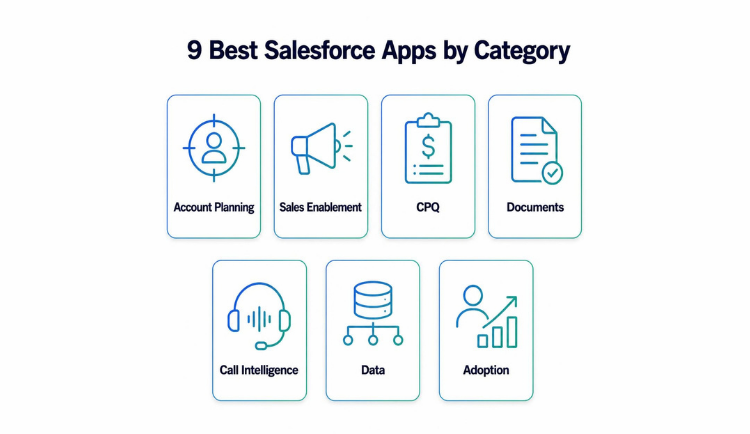
This guide covers the 9 best Salesforce apps across the categories that matter most to B2B revenue teams: account planning, sales enablement, CPQ, document generation, conversation intelligence, data enrichment, and adoption. We name specific vendors, give pricing benchmarks where we can, and flag which categories are worth the budget now and which you can defer. Use it as a shortlist, not an exhaustive directory. If you are new to the marketplace itself, start with our guide to the Salesforce AppExchange.
What Makes a Salesforce App Worth Buying
Before naming names, set the criteria. A good Salesforce app for a B2B revenue team passes four tests:
- It is native or deeply integrated. It stores data in Salesforce objects and respects your sharing rules.
- It reduces clicks. If reps have to leave the opportunity record to use the tool, adoption suffers.
- It improves data you already report on. Your existing dashboards get sharper instead of competing with a new reporting layer.
- It has a clear owner and a measurable outcome. Faster ramp, higher win rates, or larger deal sizes.
Native versus connected apps
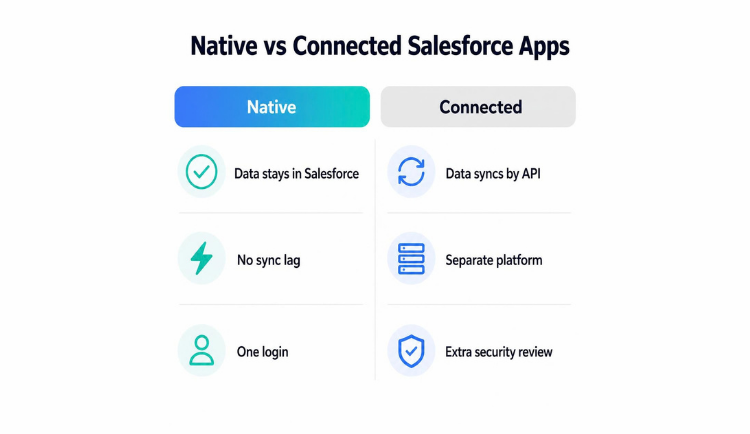
Every vendor claims to work with Salesforce, but the architecture differs. Salesforce native apps run entirely on the platform using Lightning components and Apex. Connected apps sync data through APIs and run their own infrastructure. Native is generally better for revenue teams because there is no sync lag, no separate login, and no data leaving your Salesforce org. We cover the tradeoffs in more depth in what being native on Salesforce really means.
Best Salesforce Apps for Account Planning and Sales Enablement
These two categories sit closest to revenue, and both work best when they live on the account and opportunity records your reps already use.
1. Prolifiq CRUSH (account planning)
Account planning is where many revenue teams lose the most money, because the work happens in slide decks and spreadsheets that go stale the day they are created. The best Salesforce apps in this category keep the plan inside Salesforce so it updates as the deal changes.
Prolifiq CRUSH is fully Salesforce native and built for enterprise B2B account planning. Teams build relationship maps, white space analysis, and strategic account plans directly on the account record, so the plan lives where the data lives. That also makes it a practical Salesforce revenue optimization app: expansion opportunities surface from data you already own.
Other vendors in this space include Altify, DemandFarm, ARPEDIO, Revegy, and Kapta. Altify and Revegy are mature but often carry heavier implementation timelines. DemandFarm and ARPEDIO are strong on org charting and relationship visualization. Kapta leans toward customer success and key account management. For a deeper side by side, see our roundup of the best Salesforce account planning apps.
Pricing for account planning tools generally runs 40 to 100 dollars per user per month depending on functionality and seat count. Prolifiq publishes its pricing openly.
2. Prolifiq ACE (sales enablement)
Sales enablement content is useless if reps cannot find it at the moment they need it. Prolifiq ACE is Salesforce native and delivers content management, document sharing, and engagement tracking inside Salesforce, so reps never leave the opportunity to pull a case study or pricing sheet.
Competing platforms include Highspot, Seismic, and Showpad. These are powerful, but they typically run as separate platforms that integrate with Salesforce instead of living inside it, and they are priced accordingly. The largest platforms offer broader content authoring and training modules. The question is whether your team needs that breadth or whether native delivery and tracking solve the actual problem. Our guide to sales enablement tools walks through that decision.
Best Salesforce Apps for CPQ and Document Generation
Quoting and paperwork are where deals slow down at the finish line. These apps turn Salesforce data into accurate quotes, proposals, and contracts.
3. DealHub (CPQ)
Configure, price, quote tools turn complex product catalogs into accurate quotes without spreadsheet errors. Salesforce sells its own quoting product under Revenue Cloud, which is the default choice for many orgs. Among Salesforce CPQ alternatives, DealHub is often praised for faster implementation and a cleaner guided selling experience. Conga CPQ is strong when you also need contract lifecycle management, and PROS suits pricing-heavy industries.
When to use CPQ
If your average deal involves more than a handful of SKUs, tiered pricing, or approval workflows, CPQ pays for itself by reducing quote errors and shortening cycle time. Expect list pricing from around 75 dollars per user per month, climbing with advanced features. For simple flat-rate products, you likely do not need CPQ at all. A well built opportunity product table will serve you better.
4. Conga Composer (document generation)
Generating proposals, order forms, and contracts from Salesforce data saves hours and removes copy and paste errors. Conga Composer is the long standing leader in Salesforce document generation. It is feature rich and widely adopted, though parts of it run off platform.
5. S-Docs (native document generation)
S-Docs is fully Salesforce native, which appeals to security conscious industries like financial services and life sciences because no data leaves the org. Nintex DocGen, formerly Drawloop, is another established option. Pricing varies widely, from roughly 15 dollars per user per month for lighter tools to enterprise agreements for full document automation suites. Pair document generation with e-signature through DocuSign or Adobe Sign, both of which have mature Salesforce integrations.
Top Salesforce Apps for Call Intelligence, Data, and Adoption
The next group does not create pipeline directly. It makes the pipeline you have more accurate and the process around it easier to follow.
6. Gong (conversation intelligence)
Conversation intelligence records, transcribes, and analyzes sales calls so managers can coach and reps can stop taking notes. Gong is the market leader and integrates tightly with Salesforce, logging call data to activity records. It commonly prices above 100 dollars per user per month plus a platform fee, which makes it a meaningful budget line. Chorus, now part of ZoomInfo, is the main alternative.
Salesforce also offers Einstein Conversation Insights natively, which is adequate for teams that want basic transcription and keyword tracking. The decision comes down to coaching maturity. If you have a structured coaching program that acts on call data, Gong earns its price. If you just want call records attached to opportunities, the native option is enough. For more on this category, read our overview of conversational AI for sales.
7. ZoomInfo (data enrichment)
Dirty data quietly destroys forecasting and routing. Enrichment apps fill in firmographic, contact, and intent data so your records stay accurate. ZoomInfo offers one of the deepest B2B databases and a Salesforce sync, but it is priced at the enterprise tier and typically requires an annual platform commitment.
8. Cognism (data enrichment for EMEA)
Cognism is strong in European data and GDPR compliance, which makes it the better fit for teams selling into EMEA. Lusha is a lighter option for smaller teams. If you mainly need to keep existing records clean, not prospect net new, Salesforce Data Cloud or a lighter tool may be enough. The key principle is to enrich at the point of entry so bad data never reaches your reporting.
9. Spekit (adoption and guidance)
The most expensive app is the one nobody uses. Adoption tools overlay guidance, walkthroughs, and validation prompts so reps follow process without training sessions. Spekit is popular with revenue teams because it delivers just in time enablement and field level definitions where reps work. WalkMe is more enterprise and IT driven.
Before you buy anything, try Salesforce In-App Guidance. It is built in, and paired with a clean page layout it solves most of the adoption problem for teams starting out. Buy a dedicated adoption tool when you have complex multi step processes that reps consistently get wrong.
How to Build a Salesforce App Stack Without Bloat
The most common mistake is buying overlapping tools. Conversation intelligence, enablement, and account planning can blur together if you are not deliberate. Map each app to a specific outcome and a single owner. Audit usage every two quarters and cut anything with low adoption. Favor native apps because they reduce your integration surface area and your admin's maintenance burden.
A sensible enterprise stack
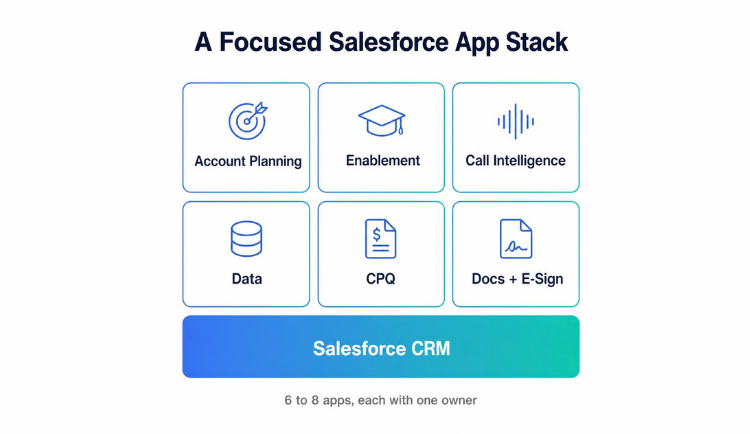
A focused B2B revenue stack often looks like this:
- Salesforce as the core
- CRUSH for account planning
- ACE for enablement
- Gong or native Einstein for conversation intelligence
- ZoomInfo or Cognism for data
- CPQ for quoting, if deals are complex
- A document generation and e-signature pair for closing
That is six to eight tools, most of them native, each with a clear job. Resist the urge to add a ninth before proving the eighth.
Vertical considerations
Regulated industries change the calculus. In life sciences and financial services, native apps that keep data inside Salesforce are strongly preferred because they simplify compliance and audit. Connected apps that move data to external infrastructure trigger additional security review and can stall procurement for months. Manufacturing teams often prioritize CPQ because of complex product configurations. Technology companies tend to weight conversation intelligence and enablement more heavily because of high velocity sales motions. Match your stack to how your industry actually sells, not to a generic best-of list.
Frequently Asked Questions
What are the best Salesforce apps for B2B sales teams?
The most impactful categories are account planning, sales enablement, conversation intelligence, CPQ, and data enrichment. For account planning and enablement, Prolifiq CRUSH and ACE are strong native choices. For conversation intelligence, Gong leads. For data, ZoomInfo is the deepest. Start with the category that addresses your biggest revenue leak.
What apps can you connect with Salesforce?
Almost any business tool. Salesforce AppExchange apps cover sales, service, marketing, finance, and IT, and most major platforms for email, e-signature, call recording, data enrichment, and quoting offer a Salesforce integration. The real question is how they connect. Native apps run inside Salesforce. Connected apps sync through APIs and keep data on their own infrastructure.
Are native Salesforce apps better than connected apps?
For most revenue use cases, yes. Native apps store data in Salesforce, respect your security model, and avoid sync lag. Connected apps can offer more features but add integration maintenance and data governance complexity, which matters most in regulated industries.
How much should I budget for Salesforce apps?
Per user pricing for revenue apps generally ranges from about 15 dollars per month for document tools to well over 100 dollars for premium conversation intelligence. A focused enterprise stack of six to eight apps adds a meaningful per user cost on top of Salesforce licenses, though enterprise discounts apply at scale.
How many Salesforce apps does a revenue team actually need?
Most teams are well served by six to eight purposeful apps. Beyond that, you risk overlap and low adoption. Audit usage twice a year and remove any tool reps are not using.
What is the difference between Prolifiq CRUSH and Altify?
Both serve account planning. CRUSH is fully Salesforce native with a faster path to value and a lower learning curve, keeping plans on the account record. Altify is mature and feature rich but often carries longer implementation timelines and a heavier methodology.
Do I need a CPQ app?
Only if your deals involve complex configurations, tiered pricing, or approval workflows. For simple flat-rate products, a well structured opportunity product table inside Salesforce is enough.
Build a Salesforce stack your reps will actually use
The best Salesforce apps keep your team inside Salesforce, sharpen the data you already report on, and tie directly to pipeline outcomes. Account planning is where most enterprise B2B teams have the most to gain, because strategic accounts drive a disproportionate share of revenue and most plans live in stale slide decks instead of the CRM. Prolifiq CRUSH is built natively on Salesforce, so your Salesforce account planning, relationship maps, and white space analysis live on the account record and update as deals move. See how it works on your own accounts.




