Key takeaways
- Account management software adds a strategic layer on top of your CRM: structured account plans, relationship mapping, white space analysis, and accountability. It is not a contact database and not a forecasting tool.
- The most important buying decision is architecture. Salesforce-native tools keep one source of truth and win on adoption. Bolt-on tools add a sync layer that drifts out of date.
- Budget roughly 40 to 150 dollars per user per month, billed annually, plus implementation.
- The leading dedicated platforms are Prolifiq CRUSH, Altify, DemandFarm, ARPEDIO, Revegy, and Kapta. Tools like LinkedIn Sales Navigator, ZoomInfo, and Gong complement a platform, they do not replace it.
- If your team runs on Salesforce and growth depends on a finite set of strategic accounts, native architecture plus adoption should decide your shortlist.
The best account management software spans a wider range than most "best of" lists admit. Some account management tools are built for planning and expansion, some for relationship mapping, some for account intelligence, and some are really just CRM extensions. This guide explains how the major platforms actually differ, what to look for, and where each one fits.
Start with the problem this software exists to solve. Ask any account manager where their account data lives and you will hear the same complaint: it goes stale the moment an account changes hands. As a strategic account moves from BDR to AE to account manager, the plan, the contacts, and the context scatter across the CRM, a few spreadsheets, and someone's inbox. Account managing software exists to stop that drift, so the plan and the relationship map stay current and usable, quarter after quarter.
What is account management software?
Account management software is a system for planning, executing, and tracking strategy on your most important customer accounts. It sits on top of your CRM and adds the layer that reps and managers actually use to grow relationships over time.
The four core functions
- Account planning: structured templates that capture goals, stakeholders, competitive position, and the plan to grow the account. Start from our account plan template if you are building one by hand.
- Relationship mapping: visual org charts that show who matters, who supports you, and who is blocking you. See our relationship mapping guide.
- White space analysis: a clear view of which products are sold into which divisions and where the gaps are.
- Activity tracking and accountability: linking plan actions to real tasks and opportunities so the plan does not die after the offsite.
CRM vs. account management software
A CRM is a system of record: it stores accounts, contacts, and opportunities across the full customer lifecycle. Account management software is a system of action for the strategic-account motion: it makes the plan structured, the relationships visible, and the next step owned. Put simply, a CRM tells you what happened, and account management software tells you what to do next and who owns it. Many teams run both, and some CRMs bolt on light versions of these features, but complex, long-term accounts usually justify a dedicated tool.
Account management vs. opportunity management
Opportunity management is deal-centric. It tracks a single sales cycle from first call to close. Account management is relationship-centric and time-unbounded. A single strategic account might produce twenty opportunities over five years. Account management software keeps the long view intact so each new deal builds on accumulated knowledge instead of starting cold.
Why generic CRM falls short
Salesforce, Microsoft Dynamics, and HubSpot are excellent systems of record. They are weak systems of action for strategic account work. They store accounts, contacts, and opportunities as flat records, and they do not natively show a relationship map, force a structured account plan, or surface white space across a product portfolio.
Teams try to fill the gap with custom objects, report builders, and slide decks. This works for a quarter and then collapses: the slides go stale, the custom objects fill with inconsistent data, and managers cannot roll up account health because every rep does it differently. The signal that you have outgrown raw CRM is simple. If you cannot answer "what is our plan for our top twenty accounts, and who owns each next step" in under five minutes, your CRM is not enough. Outside data from sales intelligence software can enrich an account plan, but it does not replace one.
The best account management software vendors
The market has consolidated around a handful of serious platforms, each with a different center of gravity. If you want a deeper side-by-side on planning tools specifically, see our guide to the best account planning software.
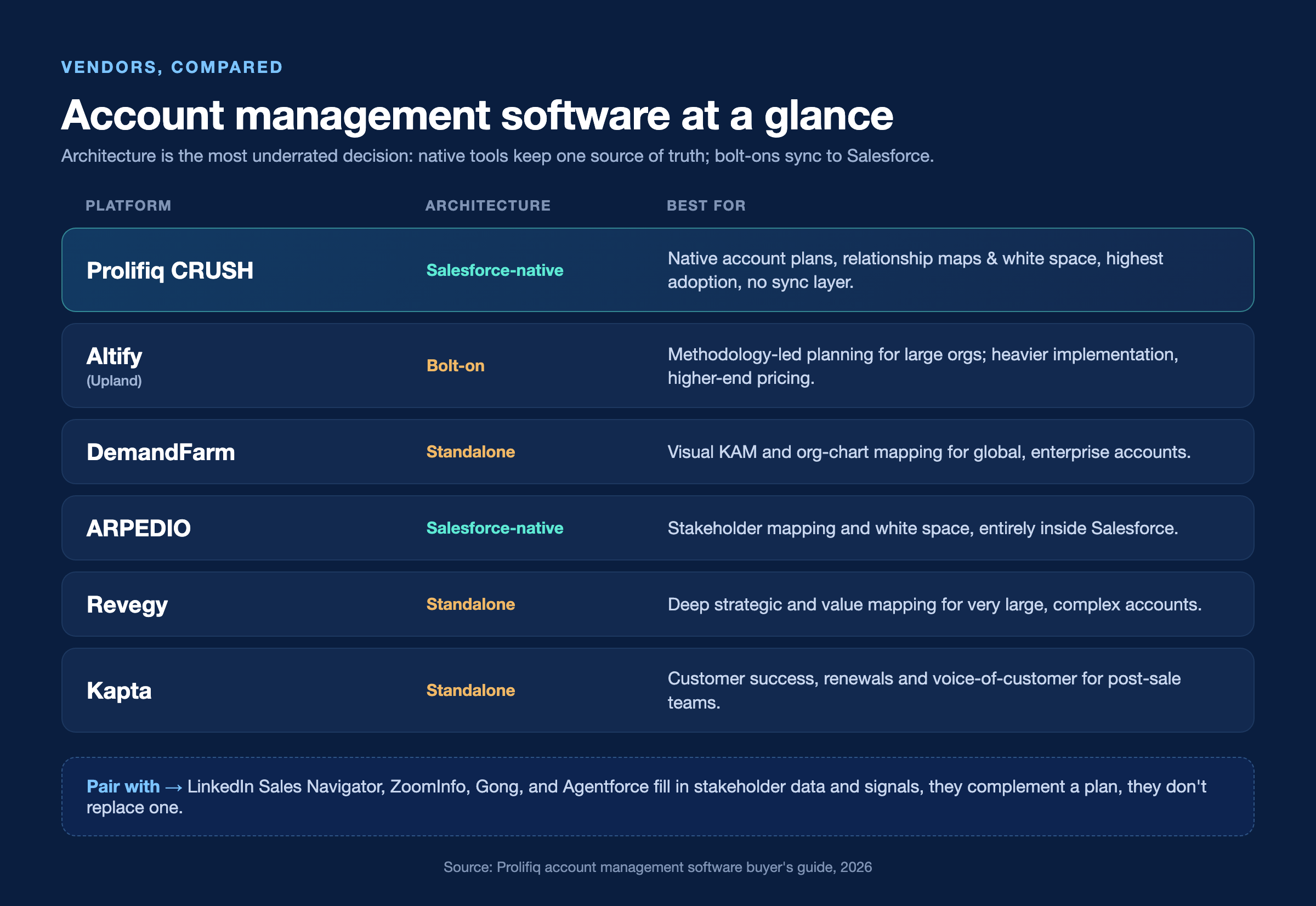
Prolifiq CRUSH
What it does: account planning and relationship mapping built 100 percent native to Salesforce, so the plan and the stakeholder map live on the same record as the deal. Learn more on the account planning software for Salesforce.
Best for: Salesforce teams whose account plans keep going stale because they are maintained in a disconnected tool.
Watch-outs: purpose-built for the Salesforce-centric, strategic-account motion; teams not on Salesforce should look at the standalone options below.
%22%20(after%20the%20%22Watch-outs-%22%20line).png)
Altify
What it does: a broad account planning and opportunity management suite with strong sales-methodology content, part of the Upland family.
Best for: larger orgs already invested in a formal sales methodology.
Watch-outs: heavier implementation and higher-end pricing; some buyers find it layered on top of Salesforce rather than fully native.
DemandFarm
What it does: a well-established standalone account planning and org-chart tool, strong on visual account mapping.
Best for: enterprise teams managing global accounts who want a dedicated planning tool and do not mind it running alongside Salesforce.
Watch-outs: as a standalone, it introduces a sync layer, and breadth can require significant configuration.
ARPEDIO
What it does: a Salesforce-native platform centered on relationship mapping, stakeholder management, and account planning.
Best for: teams that want strong buying-group visualization and white space entirely inside Salesforce.
Watch-outs: narrower brand presence than the largest incumbents; shortlist it directly against other native options.
Revegy
What it does: visual account and territory planning with white space and value mapping for large strategic accounts.
Best for: enterprise teams running a formal, multi-account territory planning program.
Watch-outs: depth is aimed at very large accounts; can be more than smaller programs need.
Kapta
What it does: key account management and customer success focused on account plans, voice of the customer, and outcome tracking.
Best for: post-sale teams whose priority is retention, renewals, and growth rather than new-logo sales.
Watch-outs: oriented to customer success motions; a sales-led team may want a planning-first tool.
Salesforce-native vs. bolt-on account management tools
This is the single most underrated decision in the evaluation. Bolt-on tools run on their own infrastructure and sync data back and forth with Salesforce through the API. Native tools are built on the Salesforce platform itself, so the data never leaves and there is no sync layer.
The difference matters in practice. Bolt-on tools introduce sync lag, duplicate data, and a second login. Reps update the plan in one system and the opportunity in another, and the two drift apart. With a native platform, the account plan, the relationship map, and the opportunity live on the same records, with one source of truth, one security model, and one reporting layer.
Why native wins on adoption
Adoption is where most account management software fails. If a rep has to leave their CRM to do account planning, they will not do it consistently. Native architecture keeps the work inside the tool reps already use every day, which often decides whether a deployment succeeds or quietly dies after six months. Push hard on what "native" actually means, because some vendors claim native but run material logic off-platform.
Want to see what native looks like on your own accounts? Book a short demo of Prolifiq CRUSH.

Tools to pair with your account management platform
Not every tool on a "best account management software" list is a competitor. Some sit alongside a dedicated platform and feed it better data. Treat these as complements to your account plan, not replacements for it.
- LinkedIn Sales Navigator: maps stakeholders and role changes inside a target account, useful for filling in the buying group before you build the relationship map.
- ZoomInfo: keeps contact and company data current at scale, with org charts and intent signals.
- Gong (or similar conversation intelligence): surfaces what is being discussed inside an account, catching stakeholder mentions and risk signals before they reach a CRM field.
- Agentforce and similar AI assistants: flag account risk, draft account summaries, and highlight stakeholder gaps automatically.
These tools gather signal, but the plan, the relationship map, and the accountability still need to live where your team works, inside Salesforce.
Key account management tools
If your focus is a short list of very large strategic accounts, the evaluation looks a little different, with more weight on executive relationships and multi-year planning. We cover that segment in our key account management software guide.
Account management software pricing and key features
Pricing benchmarks
Pricing is almost always per user per month, billed annually, and is rarely listed publicly. Based on typical enterprise deals, expect roughly 40 to 150 dollars per user per month depending on the vendor, the feature tier, and your seat count. Methodology-heavy platforms like Altify and Revegy tend to sit at the top of that range, especially when bundled with training and consulting. Salesforce-native platforms can come in lower on total cost because they avoid integration overhead and shorter implementation cycles. Implementation is a separate line item, from a few thousand dollars for a lightweight native rollout to five or six figures for a heavily customized enterprise deployment.
Do not just compare license prices. Factor in implementation time, admin overhead, and the hidden cost of a sync layer that breaks. A tool that costs 20 dollars less per seat but takes four months longer to deploy is not the cheaper option.
Key features to evaluate
Cut any vendor that cannot demonstrate these live on real-looking data.
- Structured account plans: a consistent plan structure across the team, with action plans tied to real Salesforce tasks and rollups for management review.
- Relationship and influence mapping: visual org charts that capture influence, sentiment, and relationship strength, connected to Salesforce contacts so the map never goes stale.
- White space and revenue mapping: which products are sold into which parts of the account and where the gaps are. This is where expansion revenue comes from, and the feature most teams underuse.
- Reporting and rollups: account health, plan completion, and pipeline coverage across a whole book of business without exporting to a spreadsheet.
.png)
Account management software by industry
- Life sciences: complex buying groups across hospitals, IDNs, and payers make relationship mapping and compliance-aware planning essential.
- Financial services: strict data governance means Salesforce-native architecture is often a hard requirement.
- Manufacturing and technology: multi-division accounts make white space analysis a direct cross-sell driver.
How to evaluate and implement account management software
Run the evaluation on your own accounts
The fastest way to waste a quarter is to evaluate on feature checklists alone. Pick five real strategic accounts and ask each vendor to build a plan and relationship map on that data during the proof of concept. Pull your CRM admin and a frontline rep in early: the admin will surface architecture and data issues, and the rep will tell you whether they would actually use the tool. Define success metrics before you sign (plan completion rate, expansion pipeline created, renewal rate on managed accounts) and set a baseline now so you can prove value in two quarters.
Common implementation mistakes
Three mistakes account for most failed rollouts. First, over-configuration: teams model every nuance on day one and end up with a tool no rep will use. Start simple and add later. Second, skipping change management: reps need training, managers need to inspect plans in one-on-ones, and leadership needs to use the rollups in real reviews. Third, choosing a bolt-on architecture in a Salesforce-centric organization, where the sync layer becomes a constant source of data-integrity complaints.
What is changing in 2026
AI is moving from note-taker to analyst, surfacing account risk and flagging stakeholder gaps, with Salesforce Agentforce as the native example. Teams are consolidating their stack, favoring platforms that live inside the CRM over another standalone login. And buyers increasingly weigh adoption over feature checklists, because the best-configured tool is worthless if reps will not use it.
Related reading: what account management is.
Account management software FAQ
What is the difference between account management software and CRM?
A CRM is a system of record that stores accounts, contacts, and opportunities. Account management software adds the strategic layer on top: structured account plans, relationship mapping, white space analysis, and accountability. A CRM tells you what happened; account management software tells you what to do next and who owns it.
What is the best account management software?
It depends on your stack and motion. For Salesforce-centric teams growing a finite set of strategic accounts, a native platform such as Prolifiq CRUSH wins on adoption and single source of truth. Teams not on Salesforce, or those wanting heavy methodology, should evaluate standalone options like DemandFarm, Altify, or Revegy.
How much does account management software cost?
Most vendors price per user per month, typically 40 to 150 dollars depending on platform and feature tier, billed annually. Implementation fees are separate. Native platforms often have lower total cost of ownership because they avoid integration overhead.
Is Salesforce-native account management software better than a bolt-on tool?
For Salesforce-centric organizations, yes in almost every case. Native architecture means one source of truth, no sync lag, a shared security model, and much higher adoption because reps never leave Salesforce.
How long does implementation take?
A lightweight Salesforce-native rollout can go live in a few weeks. A heavily customized enterprise deployment with multiple methodologies and integrations can take 12 to 16 weeks.
How do I measure ROI from account management software?
Track renewal rate on managed accounts, expansion pipeline created from white space, plan completion rate, and time to build a usable account plan. Set baselines before you deploy so you can show movement within two quarters.
Choosing the right platform for your revenue team
If your organization runs on Salesforce and your growth depends on a finite set of strategic accounts, the choice comes down to two things: native architecture and adoption. Everything else is secondary. A tool that reps actually use, built directly on the platform your data already lives in, will outperform a feature-rich bolt-on that creates a second system to maintain.
Prolifiq CRUSH is account management software built 100 percent native to Salesforce. It delivers structured account plans, relationship and influence mapping, and white space analysis without moving your data off-platform, which is why adoption holds and renewals improve. See how it works on your most important accounts.