%20A%20Guide%20for%20B2B%20Deals.png)
Most B2B deals do not die because of price or product. They die from drift. A champion goes quiet for two weeks, a security review nobody scheduled blocks the quarter, procurement appears in week ten with questions that should have surfaced in week two. The deal slips, then slips again, then disappears into the graveyard of opportunities marked Closed Lost with no clear reason. A mutual action plan, sometimes called a MAP or a close plan, is the antidote. It is a shared document that maps every step from now until signature, names the owner of each step, and sets a date for each one. Both sides own it. Both sides update it.
The problem is that most reps either skip the mutual action plan entirely or build a sloppy one in a slide deck that never gets opened again. A good mutual action plan template fixes that. It gives the seller a repeatable structure, gives the buyer a sense of control over their own evaluation, and gives sales leaders a forecast signal that is far more reliable than gut feel. When a buyer agrees to specific dates and assigns their own people to tasks, they are telling you the deal is real. When they refuse, they are telling you something too.
This guide gives you a complete mutual action plan template you can use today, explains the fields that matter, shows how to run it across the deal lifecycle, and covers how to operationalize it inside Salesforce so it lives where your team already works instead of dying in a forgotten attachment.
What a Mutual Action Plan Actually Is
A mutual action plan is a jointly owned roadmap that lists every task required to move a deal from current stage to signed contract and onboarding, with an owner and due date attached to each task. The word mutual is the important part. This is not a seller checklist hidden from the customer. It is a shared artifact that both the buying group and the selling team contribute to, review, and update on a recurring basis.
The core idea comes from the reality of modern B2B buying. Gartner research has shown that the typical B2B purchase now involves six to ten decision makers, each armed with their own information and often their own agenda. Buyers spend only about 17 percent of their total purchase journey with any single supplier sales rep. The rest is spent in internal meetings, independent research, and approvals you never see. A mutual action plan pulls that hidden work into the open. It surfaces the legal review, the IT security questionnaire, the budget approval, and the executive sponsor sign off that would otherwise blindside you in the final week.
Done well, a mutual action plan does three jobs at once. It aligns expectations so neither side is surprised. It creates accountability because every task has a name and a date next to it. And it generates forecast signal, because a buyer who actively maintains the plan is dramatically more likely to close than one who lets it go stale.
The Core Mutual Action Plan Template
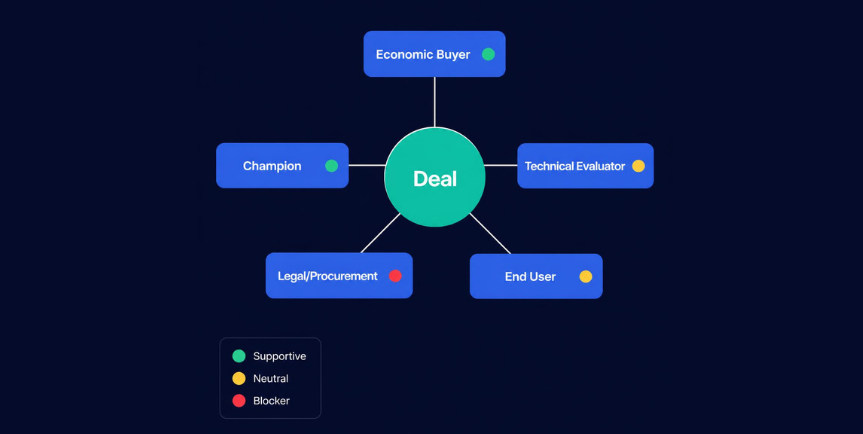
Here is the structure every mutual action plan should contain. You can build this in a shared doc, a spreadsheet, or natively inside your CRM. The format matters less than the discipline of filling it in completely.
Header Section
Capture the basics at the top so the plan is self explanatory to anyone who opens it. Include the account name, the opportunity name and value, the target close or go live date, the executive sponsor on each side, and the version date. A plan that does not show when it was last updated invites neglect.
Objectives and Success Criteria
State, in the buyer's own words, what they are trying to achieve and how they will measure success. For example, reduce account planning cycle time from three weeks to one, or consolidate three tools into one Salesforce native platform by Q3. This anchors every downstream task to a business outcome rather than to your product features.
The Task Table
This is the heart of the plan. Each row is a task with these columns: task description, owner, owner organization (buyer or seller), due date, status, and dependencies. Tasks should be specific and verifiable. "Get budget approved" is weak. "VP of Finance approves $120K budget line in October planning cycle" is strong.
Stakeholder Map
List every person involved in the decision, their role, their stance, and what they need to say yes. This keeps the plan honest about who actually has to be convinced.
The Stages Every Mutual Action Plan Should Cover
.png)
A complete mutual action plan walks backward from the contract signature and forward from today. Most plans organize tasks into recognizable phases. Use these as your spine.
Discovery and validation. Tasks that confirm fit, including technical deep dives, reference calls, and requirements gathering. This is where you validate that the problem the buyer described is real and worth solving.
Proof of value. Pilots, proof of concept, sandbox evaluations, or trial periods with defined exit criteria. Name the metrics that determine success before the trial starts, not after.
Business case and approval. ROI documentation, internal presentations, budget approval, and executive sponsor sign off. This phase often hides the longest delays, so map it carefully.
Procurement and legal. Security reviews, vendor onboarding, MSA redlines, data processing agreements, and insurance verification. In enterprise deals this phase can consume four to eight weeks on its own, so start it early.
Signature and kickoff. Final approval routing, e signature, and the transition to implementation. The plan should not end at signature. It should hand off cleanly into onboarding so the customer experiences continuity.
How to Build Tasks That Actually Move Deals
The difference between a mutual action plan that works and one that gathers dust is the quality of the tasks. Three rules govern good tasks.
Every Task Has a Date and an Owner
A task with no due date is a wish. A task with no owner is a task nobody does. Force both. When you build the plan with the buyer, ask them directly: who on your team owns the security review, and when does it need to be done? If they cannot answer, you have just discovered a gap that would have surfaced later as a surprise.
Assign Tasks to the Buyer, Not Just Yourself
A plan where every owner is a seller name is not mutual. It is a seller to do list. The buyer must own real work: scheduling internal meetings, gathering requirements from their teams, securing budget, routing legal. Buyer ownership is the single strongest signal of deal health. When a buyer accepts and completes tasks, they are investing in the outcome.
Make Dependencies Explicit
Many deals stall because a task that everyone forgot was a prerequisite blocks everything downstream. Security review cannot start until the NDA is signed. The business case cannot be presented until the pilot results are in. Mark these dependencies so the critical path is visible. When one task slips, the plan shows you exactly what else moves.
Running the Plan as a Living Document
A mutual action plan is not a one time artifact. It is a recurring ritual. Review it in every deal meeting. Update statuses in real time. Send the buyer a refreshed version after each touchpoint with the changes highlighted.
The cadence matters. For active enterprise deals, a weekly review keeps momentum. The most effective sellers open the plan at the start of every customer call and walk through what was completed, what is next, and what is at risk. This turns the meeting from an open ended conversation into a focused working session. It also conditions the buyer to treat the plan as the source of truth.
When tasks slip, do not hide it. A red status on a slipped task is not a failure of the plan, it is the plan doing its job. It surfaces the problem while there is still time to fix it. The worst outcome is a plan that shows all green right up until the deal goes dark. Honest status tracking is what makes the plan a reliable forecast input rather than a vanity document.
Mutual Action Plans Inside Salesforce
The biggest reason mutual action plans fail is that they live outside the system of record. A plan built in a standalone doc or a separate point tool becomes invisible to managers, disconnected from the opportunity, and forgotten by the rep. The fix is to bring the plan into Salesforce where the opportunity, the contacts, and the activity history already live.
When the mutual action plan is native to Salesforce, several things become possible. Managers can see plan completion percentage as a column in their pipeline reports. Forecast roll ups can weight deals by plan health, not just by stage. Tasks tie directly to the opportunity and to specific contact records, so the stakeholder map and the action plan reinforce each other. And the plan updates automatically reflect in dashboards, so leadership gets deal health signal without asking reps for status updates.
This is the layer most generic templates miss. A spreadsheet template gets you started, but it does not scale across a team of forty reps and a thousand open opportunities. Embedding the mutual action plan in your CRM turns an individual seller habit into a repeatable, measurable, coachable revenue process.
Common Mistakes That Kill Mutual Action Plans
Even teams that adopt mutual action plans often undermine them. Watch for these failure patterns.
Building it too late. A close plan introduced in the final two weeks is just a panic checklist. The value compounds when you start the plan early, ideally during validation, so the buyer co builds it with you.
Making it seller heavy. If the buyer never owns a task, the plan is theater. Push for genuine buyer accountability from the first version.
Letting it go stale. A plan last updated three weeks ago is worse than no plan because it gives false confidence. Update it every week or kill it.
Treating it as a sales tool only. The best mutual action plans frame the buyer as the protagonist. The objectives are theirs, the success criteria are theirs, and the plan helps them get their own purchase across the line. Reps who present it as a buyer enablement tool see far higher engagement than those who present it as a sales process.
Measuring Whether Your Mutual Action Plans Work
If you roll out mutual action plans across a team, measure the impact so you know what is working. Track plan adoption rate, the percentage of qualified opportunities with an active plan. Track buyer engagement, measured by how many tasks buyers own and complete. And track the win rate and cycle time of deals with a healthy plan versus those without.
Teams that operationalize mutual action plans well typically see meaningfully shorter sales cycles and higher win rates on the deals that maintain an active plan, because the discipline forces problems into the open early. The plan also improves forecast accuracy, because plan completion is a far better predictor of close than stage alone. A deal sitting in late stage with a stalled plan is a deal at risk, and the plan tells you before the close date arrives.
Frequently Asked Questions
What is the difference between a mutual action plan and a close plan?
The terms are often used interchangeably. A close plan tends to describe a seller side checklist focused on getting to signature. A mutual action plan emphasizes joint ownership between buyer and seller, with the buyer accountable for their own tasks. The mutual version is more effective because shared ownership creates real commitment and surfaces hidden obstacles earlier.
When should I introduce a mutual action plan in a deal?
Introduce it as early as the validation or proof of value stage, once the buyer has confirmed the problem is real and worth solving. Building it together early gives you the most lead time on long pole items like security reviews and procurement, and it tests buyer commitment before you invest heavily in the deal.
What should I do if a buyer refuses to engage with the plan?
Refusal is valuable information. A buyer who will not commit to dates or own tasks is signaling that the deal is not a priority or that the real decision maker is someone else. Use the resistance as a diagnostic. Ask what would need to be true for them to commit, and listen carefully to the answer.
How detailed should a mutual action plan be?
Detailed enough that every task is specific and verifiable, but not so granular that maintaining it becomes a burden. A typical enterprise plan has fifteen to thirty tasks across the phases. Each task should be something a person can clearly mark complete, with a real owner and a real date.
Can mutual action plans work for smaller or transactional deals?
Yes, but scale the format. A transactional deal with a single decision maker may need only a lightweight five task plan covering trial, business case, approval, and signature. Reserve the full template for complex deals with multiple stakeholders and long procurement cycles, where the coordination value is highest.
Should the mutual action plan live in a document or in the CRM?
In the CRM, ideally native to Salesforce. A standalone document is fine for a single rep experimenting, but it becomes invisible to managers and disconnected from the opportunity. Embedding the plan in your system of record makes it measurable, coachable, and a reliable forecast input across the entire team.
Put Your Mutual Action Plans Where the Deal Already Lives
A mutual action plan template is only as good as the discipline behind it and the system it lives in. A template in a spreadsheet helps one rep. A mutual action plan built natively into Salesforce turns deal execution into a repeatable, measurable process across your whole revenue team. Prolifiq CRUSH brings account planning, stakeholder mapping, and mutual action plans together inside Salesforce, so plan health rolls up into your forecast and managers can coach to it without chasing status updates. See how CRUSH operationalizes mutual action plans on the platform your team already uses at Prolifiq CRUSH.
Mutual Action Plan Software vs. a Spreadsheet Template
Free mutual action plan template downloads like this one are a strong starting point, but most teams outgrow the spreadsheet version fast. The moment you have more than a handful of open deals, keeping a MAP current in a shared doc becomes another task nobody owns. That is the gap mutual action plan software closes: instead of a static file that goes stale, the plan lives inside your CRM, updates as tasks are completed, and rolls up into forecast and pipeline reporting automatically. Prolifiq CRUSH is purpose-built mutual action plan software for Salesforce teams that need that visibility without adding another tool to the stack.