Most enterprise deals do not die because of price or product. They die because the seller never understood who actually made the decision. In a typical seven figure B2B purchase, Gartner research puts the number of buying group members at six to ten people, and many of those people never appear on a single email thread the rep can see. Salesforce relationship mapping exists to fix this blind spot. It turns the flat list of contacts sitting in your CRM into a visual picture of who reports to whom, who influences whom, and who is quietly trying to kill your deal.
The problem is that raw Salesforce out of the box does not do this well. The Contacts related list shows names, titles, and maybe a reporting field if someone bothered to fill it in. It does not show political dynamics. It does not flag the procurement leader you have never spoken to. It does not tell you that your only champion is leaving in three weeks. Sales teams compensate by storing this intelligence in slide decks, spreadsheets, and the heads of individual reps. When that rep leaves, the knowledge leaves with them.
This guide shows you how to actually build Salesforce relationship mapping, step by step, plus how to decide between doing it natively and buying a tool. If you sell into complex organizations with multiple stakeholders, this is the difference between forecasting on hope and forecasting on coverage. Relationship mapping is one component of a complete account plan. The full framework is in our guide to Salesforce account planning.
What Salesforce Relationship Mapping Means
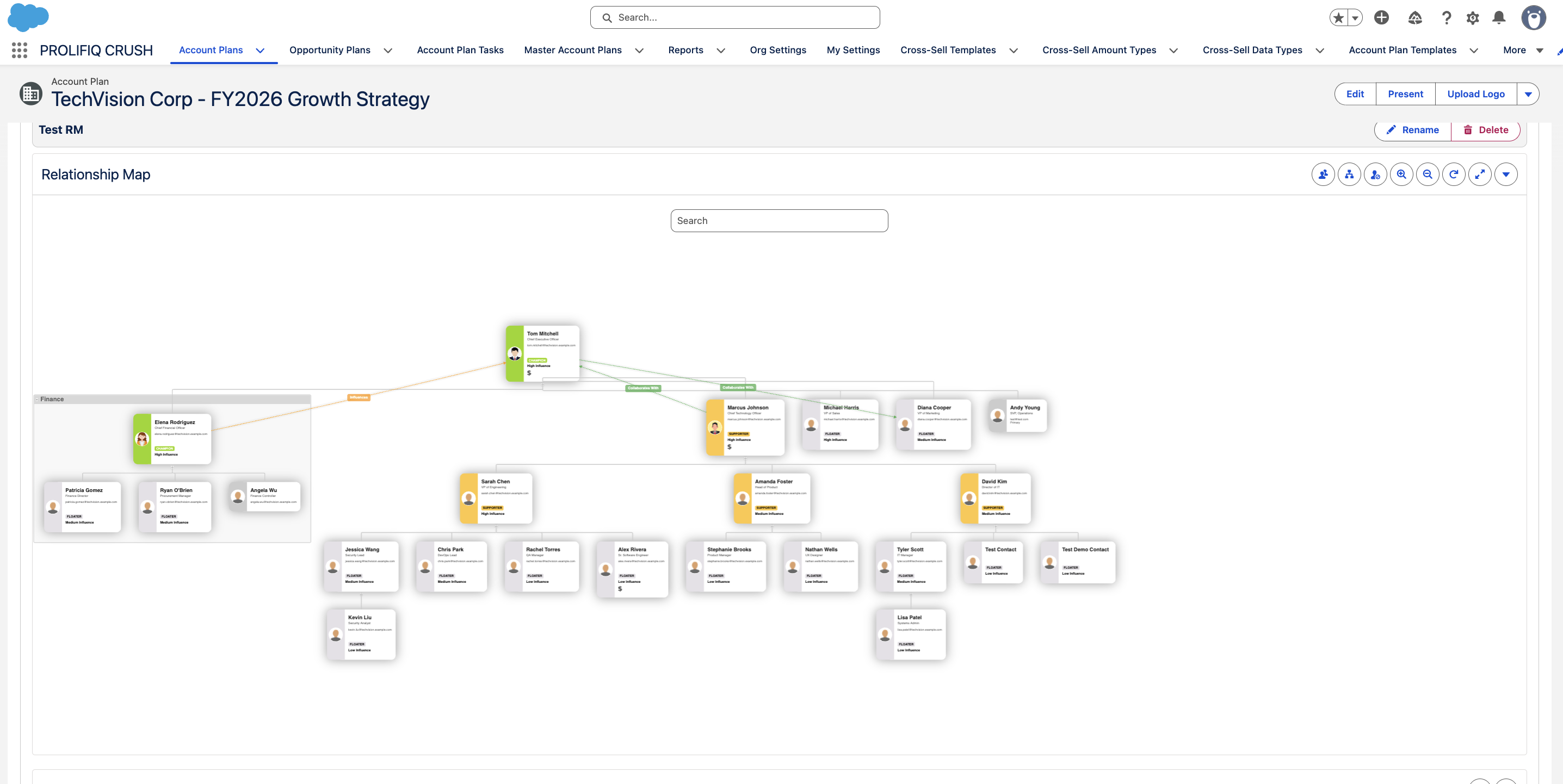
Relationship mapping is the practice of visually documenting the people inside a target account, their roles in the buying decision, their reporting structure, and their attitude toward you and your solution. A complete map answers four questions on a single screen. Who are the players? How are they connected? What is each person's level of influence? And where do they stand on your deal, from active champion to active detractor?
A contact list is a directory. A relationship map is intelligence. The list tells you a name exists. The map tells you that this VP of Operations reports to the COO, was burned by a competitor two years ago, and is friendly with your champion. That context changes how you sell.
Done right, the map becomes a living artifact the entire deal team uses, not a one time exercise you complete to satisfy a sales manager. It updates as people change jobs, as new stakeholders surface, and as sentiment shifts. The best maps also surface gaps. If you have strong coverage in IT but no relationship with the CFO who signs the check, the map makes that risk impossible to ignore.
Why Native Salesforce Isn't Enough on Its Own
Salesforce stores contacts, accounts, and opportunities beautifully. What it does not do out of the box is connect those contacts into a hierarchy or visualize political dynamics. The standard Contact object has a Reports To field, but it is rarely populated and it only captures formal org structure, not influence. There is no native concept of a buying group, a champion score, or a relationship strength rating.
The Reports To field only shows hierarchy, not influence
Teams try to work around this. Some build custom objects to track stakeholder roles. Others use Salesforce reports to pull lists of contacts by opportunity. A few brave admins attempt to build org charts with custom Lightning components. These approaches break down at scale. They require constant manual maintenance, they live outside the rep's daily workflow, and they produce static output that goes stale within weeks.
The data quality trap
Even when teams commit to mapping, the underlying contact data is often a mess. Duplicate records, missing titles, and stale ownership make any map only as good as the inputs. This is why successful relationship mapping initiatives pair the visualization layer with discipline around data hygiene. A beautiful map built on bad data is worse than no map at all because it creates false confidence.
The Core Elements of a Strong Relationship Map
Whether you build it natively or buy a tool, every effective Salesforce relationship map captures the same building blocks.
Org hierarchy and reporting lines
The structural backbone. Who reports to whom, which departments are involved, and how decisions flow upward. This helps you understand approval paths and identify the economic buyer above your day to day contacts.
Buying roles
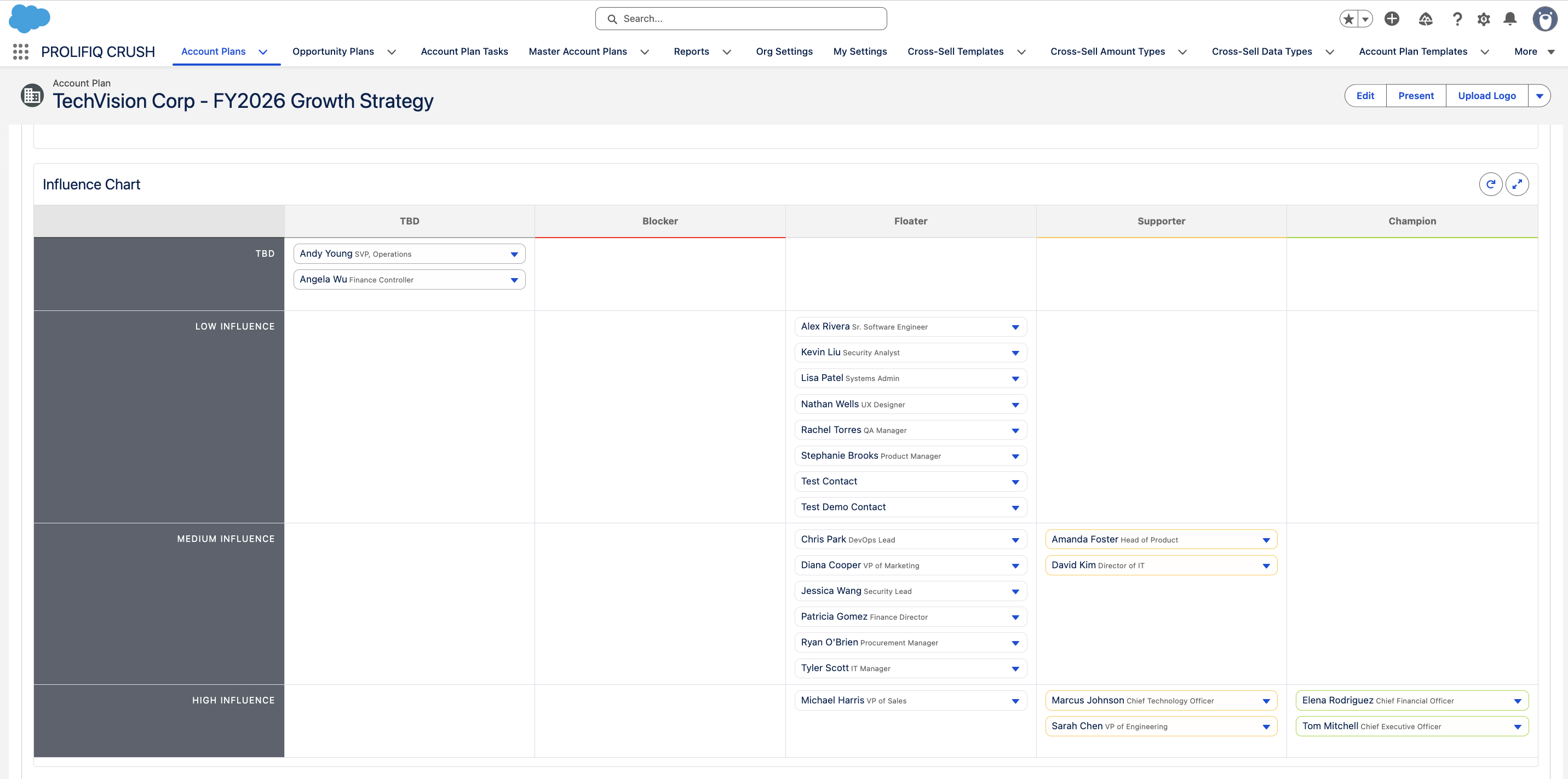
Each stakeholder should be tagged with their role in the decision. Common frameworks use categories like decision maker, influencer, evaluator, champion, coach, and blocker. This maps directly to methodologies such as MEDDIC and Miller Heiman, which is why mapping tools often align to those frameworks.
Relationship strength and sentiment
How well do you know this person, and how do they feel about you? A four point scale from no relationship to strong advocate is usually enough. Color coding makes the picture readable at a glance, with red flagging detractors and green flagging supporters.
Influence level
Not everyone with a senior title drives the decision. Mapping influence separately from title lets you spot the junior analyst who actually writes the requirements everyone else rubber stamps.
How to Build a Relationship Map in Salesforce, Step by Step
Here is the actual build process, whether you stay fully native or bring in a purpose built tool.
Step 1: Create a stakeholder object on Contact and Opportunity
Create a custom junction object between Contact and Opportunity called something like Opportunity Stakeholder. On it, add picklist fields for buying role, relationship strength, influence, and sentiment. Now each deal carries a structured list of who matters and where they stand.
Step 2: Tag every contact with a buying role
Work the account systematically and assign each contact one of the roles from the section above: decision maker, influencer, evaluator, champion, coach, or blocker. Do this for every named contact, not just the ones you talk to most, or you will miss the blockers and the quiet influencers.
Step 3: Score relationship strength and sentiment
For each contact, log how well you know them and how they feel about your solution using a simple four point scale. Update this after every meaningful touchpoint, not once at deal creation.
Step 4: Visualize the hierarchy
Use the standard Reports To field on Contact plus a Lightning component or a third party org chart widget from the AppExchange to render the structure visually. For sentiment trends, build reports and dashboards that show coverage by buying role across your pipeline.
Step 5: Put the map where reps already work
This is where native custom-object builds usually break down. Reps do not naturally think in junction objects, they think in pictures, and without a clean visual canvas on the account record itself, maintenance becomes a chore that reps skip when quarter end pressure hits. That is precisely the moment you most need the map. This step is why most teams that get serious about relationship mapping eventually move to a purpose built, Salesforce native tool instead of maintaining the custom-object version by hand.
Choosing a Salesforce-Native Relationship Mapping Tool
When native limitations bite, teams turn to purpose built software. Because these tools differ sharply in architecture, it pays to understand the landscape before you buy.
The single most important distinction is whether the tool is Salesforce native, meaning it runs entirely inside Salesforce on the Lightning Platform, or whether it is a separate application that syncs data back and forth. Native tools keep your relationship data inside your CRM, respect your existing security model, and require no extra login. Connected tools often offer slicker standalone interfaces but introduce sync delays, duplicate data, and another system for reps to maintain.
The main vendors
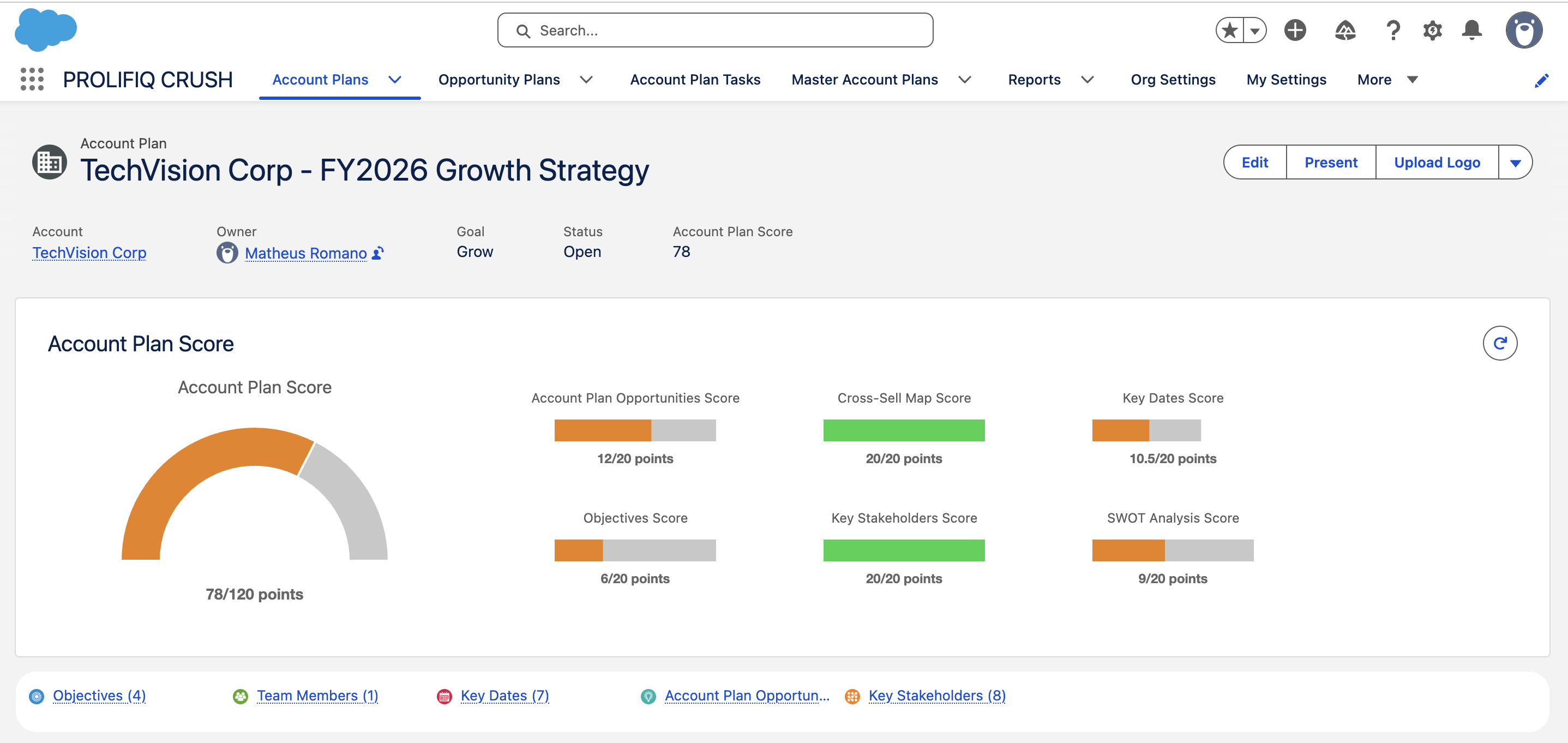
Prolifiq CRUSH is Salesforce native and combines relationship mapping with full account planning, so the org chart lives next to your whitespace analysis and action plans. Altify, now part of Upland, offers relationship maps tied to its opportunity and account management suite and is strong on methodology. DemandFarm provides dedicated org charting and account based selling features with a heavy visual focus. ARPEDIO is a native option popular in European markets with strong stakeholder and political mapping. Revegy and Kapta round out the field, with Kapta leaning toward account management and customer success use cases. Pricing across this category typically runs from 30 to 100 dollars per user per month depending on functionality and contract size, with enterprise deals negotiated annually.
What actually drives adoption
The trap many buyers fall into is choosing on demo polish rather than adoption. A gorgeous standalone tool that reps must remember to update outside their CRM workflow will sit empty within a quarter. A slightly plainer native tool that surfaces the map on the account record they already open every day gets used. If your priority is keeping everything inside Salesforce with zero data leaving the platform, native tools like Prolifiq CRUSH and ARPEDIO lead. If you want a standalone visual canvas and are comfortable with a connected architecture, DemandFarm is visually polished. If you are buying into a broader methodology program and want relationship mapping bundled with deal coaching, Altify fits. Adoption beats aesthetics every time.
Operationalizing Relationship Maps in Your Sales Process
Buying a tool, or building the native version, is the easy part. Getting consistent usage is where most programs succeed or fail.
Tie it to MEDDIC or Miller Heiman
Relationship mapping is most powerful when wired into the methodology your team already runs. MEDDIC asks you to identify the economic buyer and the champion. Your map should make both explicit and flag deals where they are missing. Miller Heiman Strategic Selling uses buying influences such as economic, user, and technical buyers, plus coaches. A good map tags every stakeholder with one of these roles so coverage gaps jump out during deal reviews.
Make it a deal review gate
Require an up to date map for any opportunity above a revenue threshold before it enters the forecast. When the map is a gate, reps maintain it. Instead of asking the rep how confident they feel, the manager can ask why there is no relationship with the procurement lead on a deal forecast to close this quarter.
Pair it with account planning
Relationship maps should not live in isolation. They belong inside a broader account plan that includes whitespace, goals, and action items. When the map sits next to the plan, updating one prompts updating the other. This also protects against turnover: when a rep leaves, the relationship intelligence stays in the CRM rather than walking out the door, as long as your tool stores history and not just current state.
Track coverage, multithreading, and win rate
Stakeholder coverage measures the percentage of buying roles with an identified contact and a relationship rating on each strategic deal. Multithreading depth counts how many contacts the team is actively engaged with per opportunity, since single threaded deals carry far more risk. Win rate by coverage level lets you correlate complete maps with higher close rates. Most teams that map seriously find that opportunities with full buying group coverage close at meaningfully higher rates than single threaded deals.
Common mistakes to avoid
The first mistake is treating mapping as a one time setup rather than a living practice. The second is mapping only the friendly contacts and ignoring blockers, which leaves you blindsided. The third is buying a disconnected tool that lives outside Salesforce, guaranteeing low adoption. The fourth is mapping titles instead of influence, which causes you to court the wrong people. The fifth is failing to tie the map to your forecast, which makes it an interesting exercise with no business consequence and therefore no staying power.
Frequently Asked Questions
What is the difference between Salesforce relationship mapping and an org chart?
An org chart shows formal reporting structure only. A relationship map layers in buying roles, relationship strength, influence, and sentiment on top of that structure. The org chart tells you who reports to whom. The relationship map tells you who matters, who supports you, and who is at risk of blocking the deal.
Can I do relationship mapping with native Salesforce alone?
Yes, for basic needs. You can build a custom stakeholder object with fields for buying role, sentiment, and influence, and use the standard Reports To field for hierarchy, following the steps above. The limitation is visualization and adoption. Native Salesforce does not provide an intuitive visual canvas, so reps tend to skip maintenance unless you add a purpose built tool.
How much do Salesforce relationship mapping tools cost?
Most tools in this category range from roughly 30 to 100 dollars per user per month depending on functionality and contract size. Enterprise agreements are negotiated annually and often bundle relationship mapping with broader account planning and enablement capabilities, which changes the per user math.
Why does native architecture matter so much?
A Salesforce native tool runs inside your CRM, respects your existing security and sharing rules, and requires no separate login or data sync. Connected tools that live outside Salesforce introduce sync delays, duplicate records, and an extra system reps must remember to update. Native architecture drives higher adoption because the map appears on the account record reps already use daily.
How does relationship mapping connect to MEDDIC or Miller Heiman?
Both methodologies depend on identifying specific buying roles such as the economic buyer, champion, and technical buyer. Relationship mapping tools let you tag each stakeholder with these roles directly on the map, so coverage gaps become visible. The map essentially operationalizes the people side of your chosen methodology.
How do I get reps to actually maintain their maps?
Make the map a requirement for forecasting and deal reviews. When an up to date map is a gate to including a deal in the forecast, maintenance becomes non negotiable. Pairing the map with the broader account plan and keeping it inside the daily Salesforce workflow also drives consistent usage.
Turn Contacts Into Coverage With Prolifiq CRUSH
If you are selling complex deals into multi stakeholder accounts, a flat contact list is not enough. You need to see the buying group, the reporting lines, the champions, and the blockers on one screen, and you need that picture to live inside Salesforce where your team already works. Prolifiq CRUSH delivers Salesforce native relationship mapping as part of a complete account planning platform, so your org charts, whitespace, and action plans all sit on the same account record with no syncing and no extra login. Relationship intelligence stays in your CRM even when reps move on, and managers get real coverage data instead of optimism during forecast reviews. See how CRUSH turns scattered contacts into account coverage at /product/account-management-software.