Opt in to AI-assisted map building and Prolifiq lays out your org chart from existing Reports To data in Salesforce. With 80% of the structure in place, you add custom relationships, groups, and badges to finish the map.
BETA
☁Salesforce contacts248
Import From:ContactsUsersLeads
SSSandra SmithChief Executive OfficerAWAmy WilliamsChief Marketing OfficerCLChen LeeChief Information OfficerMWMike WilsonChief Financial OfficerRJRicky JohnsonChief Revenue OfficerJHJoe HernandezDirector of Sales ProgramsTHTiffany HallDirector of Digital MarketingPRPaul RogersManager of ProcurementABAmanda BrownVP of Sales, Asia PacificEREmma RuralAdminPPPriya PatelGeneral CounselNTNoah ThompsonEnterprise Architect
AI relationship mapBig Sky WorldwideGenerated from 248 contacts
Procurement
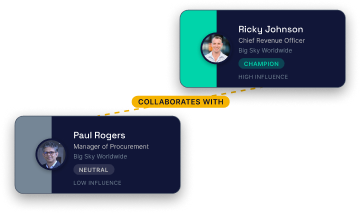
Collaborates withSSSandra Smith
Chief Executive Officer
Big Sky WorldwidesupporterHigh influenceCLChen Lee
Chief Information Officer
Big Sky WorldwideneutralMedium influenceMWMike Wilson
Chief Financial Officer
Big Sky WorldwidesupporterMedium influenceRJRicky Johnson
Chief Revenue Officer
Big Sky WorldwidechampionHigh influencePRPaul Rogers
Manager of Procurement
Big Sky WorldwideneutralLow influenceABAmanda Brown
VP of Sales, Asia Pacific
Big Sky WorldwideblockerHigh influenceEREmma Rural
Admin
Big Sky WorldwideinfluencerMedium influence
Contacts ready to generate
Build a separate map for every deal — so no opportunity gets left single-threaded.
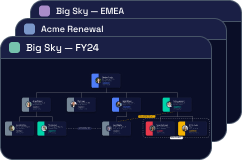
Create as many maps as you need on an account — one for the overall relationship, plus a dedicated map for each open opportunity. Every map pulls from Salesforce contacts and stays as deal teams change.
Know your blockers, champions, and economic buyers at a glance.
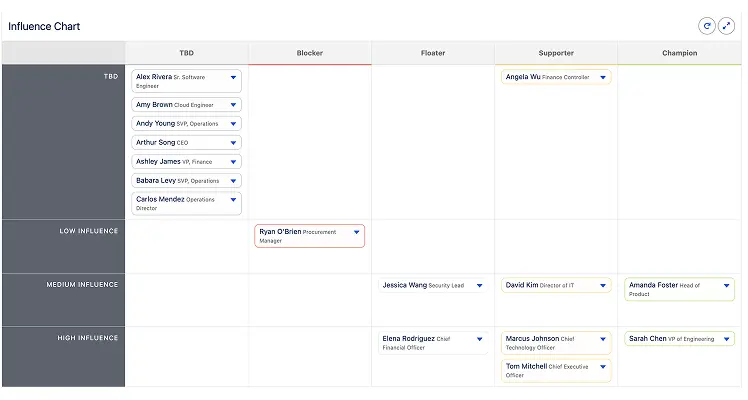
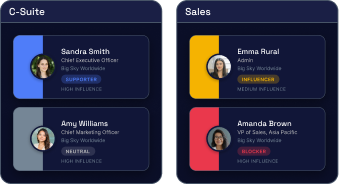
Every contact gets an influence level (low, medium, high) and a support status (blocker, neutral, supporter, champion). The influence grid plots your stakeholder landscape visually, so the team knows where to invest.
One click reveals everything the org knows about any stakeholder.
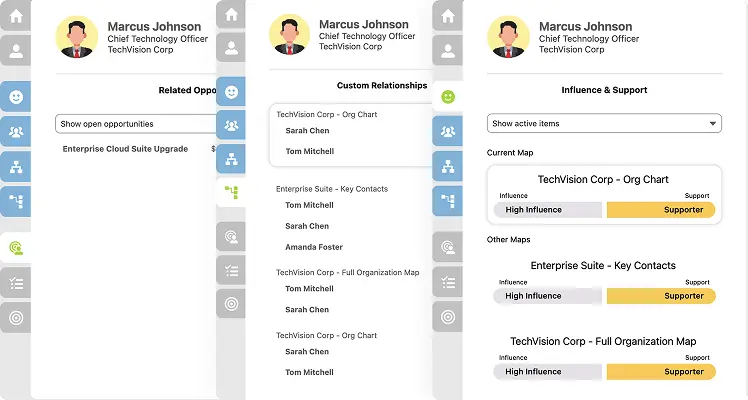
Clicking any contact opens the Omni View — a full cross-deal profile. See every plan and map they appear on across the org, their influence and support level on each, open tasks, and any campaigns joined.
Opt in to AI-assisted map building and Prolifiq lays out your org chart from existing Reports To data in Salesforce. With 80% of the structure in place, you add custom relationships, groups, and badges to finish the map.
BETA
☁Salesforce contacts248
Import From:ContactsUsersLeads
SSSandra SmithChief Executive OfficerAWAmy WilliamsChief Marketing OfficerCLChen LeeChief Information OfficerMWMike WilsonChief Financial OfficerRJRicky JohnsonChief Revenue OfficerJHJoe HernandezDirector of Sales ProgramsTHTiffany HallDirector of Digital MarketingPRPaul RogersManager of ProcurementABAmanda BrownVP of Sales, Asia PacificEREmma RuralAdminPPPriya PatelGeneral CounselNTNoah ThompsonEnterprise Architect
AI relationship mapBig Sky WorldwideGenerated from 248 contacts
Procurement
Collaborates withSSSandra Smith
Chief Executive Officer
Big Sky WorldwidesupporterHigh influenceCLChen Lee
Chief Information Officer
Big Sky WorldwideneutralMedium influenceMWMike Wilson
Chief Financial Officer
Big Sky WorldwidesupporterMedium influenceRJRicky Johnson
Chief Revenue Officer
Big Sky WorldwidechampionHigh influencePRPaul Rogers
Manager of Procurement
Big Sky WorldwideneutralLow influenceABAmanda Brown
VP of Sales, Asia Pacific
Big Sky WorldwideblockerHigh influenceEREmma Rural
Admin
Big Sky WorldwideinfluencerMedium influence
Build a separate map for every deal — so no opportunity gets left single-threaded.
Create as many maps as you need on an account — one for the overall relationship, plus a dedicated map for each open opportunity. Every map pulls from Salesforce contacts and stays as deal teams change.
Know your blockers, champions, and economic buyers at a glance.
Every contact gets an influence level (low, medium, high) and a support status (blocker, neutral, supporter, champion). The influence grid plots your stakeholder landscape visually, so the team knows where to invest.
One click reveals everything the org knows about any stakeholder.
Clicking any contact opens the Omni View — a full cross-deal profile. See every plan and map they appear on across the org, their influence and support level on each, open tasks, and any campaigns joined.
How Prolifiq Relationship Mapping works
Prolifiq’s relationship mapping software connects directly to your Salesforce contact and activity data — no setup, no manual entry.
01
Connect to Salesforce
Your existing Salesforce contacts are automatically pulled into a drag-and-drop relationship map. No new data entry required.
02
Build your map
Drag contacts into org chart positions, draw reporting lines, and assign roles. Tag each stakeholder as a champion, blocker, coach, or neutral contact.
03
Score influence and sentiment
Rate each stakeholder’s level of power, influence, and support. Every attribute is stored on a Salesforce object, making it reportable.
04
Share across your team
Share maps with the full account team and keep plans updated in Slack or Salesforce. Relationship intelligence survives rep turnover, accelerates onboarding, and gives every function the same view of every account.
Customize every map — AI builds the structure, your team owns the details
Start with an AI-built org chart from your Salesforce contacts, then drag, tag, group, and connect stakeholders the way your team actually sells — not the rigid hierarchy Salesforce gives you out of the box.
Drag-and-drop layout
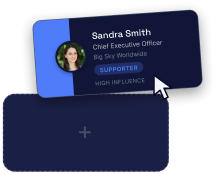
Arrange contacts into any structure, not just a fixed reporting hierarchy. Placeholder cards also available.
Custom roles and badges
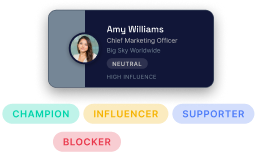
Tag contacts as champion, blocker, economicbuyer, legal, technical buyer, or create your ownrole types.
Multiple maps per account
Create separate maps for the C-suite, individualdivisions, or specific deals, all within thesame account.
Relationship lines
Map direct and indirect relationships between contacts to show informal influence, executive alignment, buying paths, or internal conflict.
Custom groups
Organize contacts by location, team, or businessunit, and map external partners and vendorsalongside internal stakeholders.
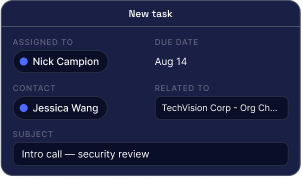
Add Contact Tasks
Create a new task to a contact directly from the map.
The result: a living, team-wide picture of every account — not a static org chart no one updates.
Up and running fast — with a team behind you
Most software deployments drag on for months. Prolifiq is 100% native to Salesforce — no integration, no data migration, no separate system — so most teams are live within days.
Dedicated onboarding — a named onboarding specialist walks your team through setup, configuration, and best practices from day one.
In-depth training sessions — live, role-specific training for reps, managers, and admins so everyone gets up to speed on what matters to them.
Video library — a full library of how-to videos covering every feature, available on demand so your team can learn at their own pace.
Detailed documentation — step-by-step guides for every configuration option, use case, and advanced feature.
Ongoing support — your team doesn’t go dark after go-live. Prolifiq’s support team is available to help as your rollout evolves.
Why revenue teams trust Prolifiq
Built for Salesforce — trusted by teams in medical devices, healthcare and pharma, high tech, professional services, industrial, and financial services.
KEY ACCOUNT & RELATIONSHIP MAPPING
“Prolifiq is the single-best way of mapping out your key accounts and decision-makers so that your GTM team is engaging the right people, with the right message on a consistent basis.”
“We grew from 450 to over 1,500 seats across multiple divisions and LATAM countries. Prolifiq scales with our most complex global deployments.”
BS
Daniel Brooks
VP of Global Sales Operations, Boston Scientific
EXPANSION REVENUE & COMPETITIVE CAMPAIGNS
“The team is jazzed to say the least — it gives visibility into all cross-sell opportunities and an unprecedented level of intelligence into next-best actions and propensity to buy. We’ve already launched competitive take-away campaigns that are the most successful we’ve ever run.”
NL
Nicholas Ludy
Chief Growth Officer, A-LIGN
KEY ACCOUNT & RELATIONSHIP MAPPING
“Prolifiq is the single-best way of mapping out your key accounts and decision-makers so that your GTM team is engaging the right people, with the right message on a consistent basis.”
“We grew from 450 to over 1,500 seats across multiple divisions and LATAM countries. Prolifiq scales with our most complex global deployments.”
BS
Daniel Brooks
VP of Global Sales Operations, Boston Scientific
EXPANSION REVENUE & COMPETITIVE CAMPAIGNS
“The team is jazzed to say the least — it gives visibility into all cross-sell opportunities and an unprecedented level of intelligence into next-best actions and propensity to buy. We’ve already launched competitive take-away campaigns that are the most successful we’ve ever run.”
Relationship mapping software helps sales teams visualize the contacts and stakeholders inside an account — showing org structures, decision-making authority, and influence. Prolifiq’s relationship mapping software is built directly inside Salesforce, so your maps stay in sync with your CRM data automatically.
What is the best relationship mapping software for Salesforce?
Prolifiq is relationship mapping software built 100% natively on Salesforce. Unlike tools that sync or integrate with Salesforce, Prolifiq runs on the Salesforce platform — meaning your org charts, stakeholder maps, and influence scores live where your team already works, with no integration required.
What is Salesforce relationship mapping?
Salesforce relationship mapping is the practice of building and maintaining visual stakeholder maps directly inside a Salesforce CRM record. With Prolifiq, your Salesforce contacts are automatically populated into a drag-and-drop relationship map on any account or opportunity record — no external tool, no manual sync.
What is relationship intelligence software?
Relationship intelligence software gives sales teams visibility into the health, sentiment, and influence of their key contacts. Prolifiq surfaces relationship health scores, engagement signals, and stakeholder influence directly inside Salesforce so reps can prioritize outreach and protect strategic accounts.
How does Salesforce relationship mapping work?
With Prolifiq, your Salesforce contacts are automatically pulled into a drag-and-drop relationship map. You can visualize reporting structures, tag stakeholders as champions or blockers, score influence and sentiment, and share maps across your revenue team — all inside Salesforce Lightning.
What is a buying committee map?
A buying committee map is a visual representation of all the stakeholders involved in a purchasing decision. It shows who has budget authority, who influences the technical evaluation, who acts as a champion, and who might block the deal. In Prolifiq, buying committee maps are built inside Salesforce and updated in real time as contacts change roles or engagement levels shift.
What is stakeholder mapping in sales?
Stakeholder mapping in sales is the process of identifying and categorizing every person involved in a buying decision — their role, level of influence, sentiment toward your solution, and relationship to other decision-makers. Effective stakeholder mapping helps revenue teams prioritize outreach, avoid late-stage surprises, and build multi-threaded relationships across the account.
What is the difference between an org chart and a relationship map?
An org chart shows formal reporting structure — who reports to whom. A relationship map goes deeper: it shows informal influence, sentiment, engagement history, and the relationships between stakeholders and your team. Prolifiq gives you both — a live org chart pulled from Salesforce contacts, layered with influence scores, champion/blocker tags, and engagement signals.
Can relationship mapping software integrate with Salesforce?
Most relationship mapping tools integrate with Salesforce via an API sync, which means data can go stale or fall out of sync. Prolifiq is different — it’s built natively on the Salesforce platform, not integrated with it. Your relationship maps, contact data, and engagement signals live inside Salesforce and update automatically with no sync required.
What data does relationship mapping software use?
Prolifiq draws directly from your Salesforce contact and activity data — contact records, email interactions, meeting history, and opportunity associations. It layers on that with manually scored influence and sentiment, stakeholder tags (champion, blocker, coach, neutral), and relationship health signals based on engagement patterns.
Who uses relationship mapping software?
Relationship mapping software is used primarily by enterprise sales reps, account executives, account managers, and customer success teams. It’s especially valuable in complex B2B deals with multiple stakeholders, long sales cycles, and large buying committees — common in industries like technology, financial services, healthcare, and professional services.
How do you create a relationship map in Salesforce?
With Prolifiq, you create a relationship map directly inside a Salesforce account record. Open any account in Salesforce Lightning, launch the Prolifiq Relationship Map component, and your existing contacts are automatically populated into a drag-and-drop org chart. You can then add contacts, draw reporting lines, score influence and sentiment, and tag each stakeholder’s role — all without leaving Salesforce.
See Your Accounts Differently
Book a demo to see Relationship Map in action. Discover how your team can navigate complex enterprise deals with confidence.
Auto-map your Salesforce accounts with AI — stakeholder roles, influence
levels, and buying paths surfaced without manual input. Enter your email
to claim your free access.