An account plan template gives your team one consistent structure for growing and protecting its most important customers. This one covers every section a strong plan needs, shows how the strategic, key, and sales versions differ, and explains how to keep the plan current after the first draft. It is free, and it works in Excel, slides, or a CRM.

What Should an Account Plan Template Include?
Before you build or download anything, get specific about the job. An account plan exists to grow revenue inside an existing or strategic account over a multi quarter horizon. That is different from an opportunity plan, which manages a single deal through a sales stage, and different from a call plan, which prepares you for one meeting.
A good account planning template answers five questions at any moment. Who influences the buying decision, and where do we stand with each person? How much total revenue is available in this account across products and business units? How much of it do we capture today? Which specific plays close the gap? And who owns each play, with what deadline?
If a section does not contribute to one of those five answers, cut it. Teams routinely bloat templates with competitive SWOT grids, industry trend summaries, and corporate boilerplate copied from press releases. None of that drives action. The discipline of a strong template is subtraction. If you want to run the finished plan inside your CRM, see how Salesforce account planning works end to end, and read the account planning process for the steps that come before the template.
The Core Sections of an Account Plan Template
An account plan template breaks into six sections, and each builds on the last. Skip ahead and you produce a plan with confident conclusions and no evidence behind them.
Account Overview and Financial Snapshot
Start with the facts that anchor the plan: annual recurring revenue or current spend, contract dates, products owned, the account tier, and the assigned team. Add the customer's own financials if they are public, such as revenue, growth rate, recent earnings commentary, and announced strategic initiatives. A bank that just announced a digital transformation program is telling you where its budget is going. Capture that here so every play downstream connects to something the customer already cares about.
Whitespace and Opportunity Map
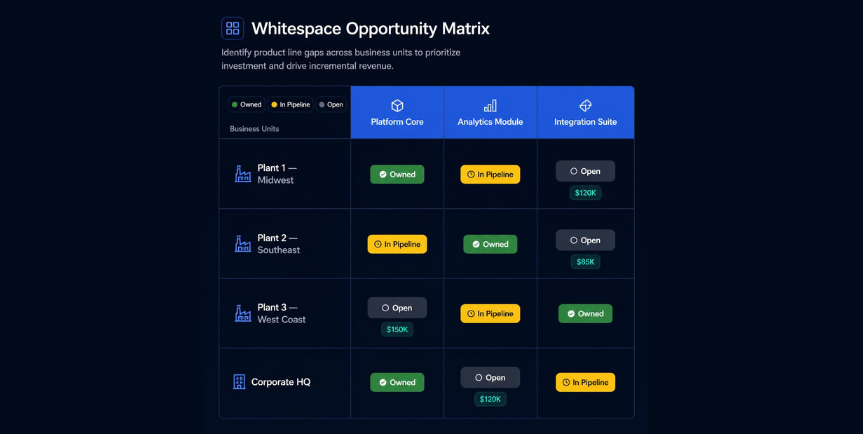
This is where most plans create value. List every product or solution you sell across the top and every business unit, region, or division of the account down the side. Mark each cell as owned, in pipeline, or open. The open cells are your whitespace. A manufacturing account using your platform in two of eight plants is a clearer expansion story than any narrative paragraph. Quantify each open cell with an estimated revenue value so the team can prioritize. Use the standalone Whitespace Analysis Matrix if you need to run this across a full book of accounts.
Stakeholder Map and Relationship Heat Map
Modern B2B deals involve six to ten decision makers, according to Gartner research on the B2B buying journey, and the number climbs in enterprise accounts. Your template needs a relationship map that captures more than titles.
For each contact, record their role in the decision (economic buyer, champion, influencer, blocker, end user), your relationship strength on a one to five scale, their business priorities, and the last meaningful interaction. Add a sentiment indicator: advocate, neutral, or working against you. A single detractor with budget authority can sink an otherwise healthy account, and a template that hides that fact is worse than no template at all. The standalone Stakeholder Analysis Template walks through scoring each contact, and the stakeholder mapping template covers org charts in more depth.
Then track relationship coverage: of the people who can fund or kill a deal, what share do you have a real relationship with? An account that hangs on one champion is exposed the day that person leaves, so flag single threaded accounts and assign someone to widen the base.
Visualize coverage by plotting influence on one axis and your relationship strength on the other. High influence contacts with weak relationships are your immediate risk. This view turns a list of names into a prioritized engagement plan. For more on the technique, see account mapping and the guide to relationship mapping.
.png)
SWOT and Competitive Position, Kept Lean
SWOT belongs in the template, in a tight form. For each account, list the two or three genuine strengths of your position, the real weaknesses, the expansion opportunities tied to the whitespace map, and the credible threats, including incumbent competitors and the status quo. Name the competitor. "Strong relationship with the VP of Operations" is a strength. "We have a champion" is not, unless you name them. A SWOT that any rep could write for any account is filler.
Risk Register
Most plans cover only the upside. Add a short register of what could shrink or lose the account: the champion leaves, a budget freeze, a competitor pushing at renewal, procurement standardizing on another vendor, open support escalations, or an M&A event that changes vendor strategy.
For each risk, record the likelihood (low, medium, high), the impact on revenue, the mitigation, the owner, and the next action with a date. Leadership needs to see where the exposure sits, not just where the upside is. An account worth 2 million dollars a year that hangs on one relationship is a bigger risk than a smaller account with broad coverage. Reward reps for surfacing risk early, because a hidden risk eventually shows up as lost revenue.
Goals, Plays, and the Action Plan
The action plan is the engine. Set two to four account level goals for the planning horizon. Examples: expand from one division to three, grow ARR from 200,000 dollars to 500,000 dollars, or secure a multi year renewal at improved terms. Each goal then breaks into specific plays.
A play has four parts: the action, the owner, the due date, and the expected outcome. "Schedule an executive alignment session between our CRO and their CFO by March 15 to align on the digital transformation roadmap" is a play. "Build executive relationships" is a wish. The difference is whether someone can be held accountable for it next week. Tie every play back to a goal and every goal back to a whitespace opportunity or a retention risk. That chain of logic is what survives scrutiny in a deal review.
Ownership depends on your team design. New logo and expansion plays typically sit with the account executive, while renewal and adoption plays sit with the account manager. See account manager vs account executive for how to split them.
Account Plan Template Examples: Strategic, Key, and Sales Versions
Teams use different names for the same document. The structure above works for all of them. What changes is which accounts get the full treatment and which section carries the most weight.
Strategic Account Plan Template
A strategic account plan template is built for the accounts that matter most to your long term revenue, including prospects you intend to win. Weight it toward the executive stakeholder map, the multi year goals, and the competitive position. It usually carries a longer horizon, often 12 to 24 months, and a named executive sponsor on your side.
Key Account Plan Template
A key account plan template covers your largest existing customers. The center of gravity is retention and expansion: whitespace, relationship coverage, risk register, and renewal timing. For the broader discipline behind it, see the guide to key account management.
Sales Account Plan Template
A sales account plan template (also searched as a sales account planning template) leans on pipeline. Add a short opportunity list with stage, value, and close date, and tie every play to a deal or a deal creating activity. It is the lightest of the three and the easiest to start with.
A Filled Example
Picture a 300,000 dollar ARR technology account. The financial snapshot shows a renewal in eight months and two of five product lines owned. The whitespace map flags analytics and security modules as open, worth an estimated 250,000 dollars. The relationship map shows a strong champion in IT but no relationship with the new CFO who controls budget. SWOT names the incumbent competitor defending the security module.
Goals: secure the renewal, win analytics, and build a CFO relationship. Plays: an executive briefing with the CFO by next month, a security competitive displacement proposal by quarter end, and an analytics pilot scoped with the champion. Every play has an owner and a date. That is a plan a leader can act on.
Choosing an Account Plan Format: Excel, Slides, or CRM
The format decides whether the plan lives or dies. There are three realistic options for an account plan template.
Excel Account Plan Template
Free, flexible, and familiar. A well built Excel account plan template works for a team of three reps managing ten accounts. It breaks at scale because nothing connects to your CRM, updates are manual, and no leader can roll up data across accounts. You also lose every plan when the rep who built it leaves.
If you start with the Excel template above, set it up so it holds together as long as possible. Use one workbook per account with tabs for Overview, Relationship Map, Whitespace Grid, Opportunities, Competitive and Risk, and Action Plan. Lock the formatting and use dropdowns for account tier, relationship strength, and risk level so the data stays consistent across files. A master summary workbook that pulls account name, revenue goal, pipeline, top risk, and next QBR date gives leadership a portfolio view, but linked workbooks break whenever someone renames or moves a file. Most teams outgrow this setup somewhere past 15 to 20 accounts or once several people contribute to one plan.
Slide Template
A slide account plan template (PowerPoint or Google Slides) is the best format for presenting a plan to leadership or a customer. It is a poor format for maintaining one. Use it as the review deck, and keep the working plan somewhere that updates.
CRM Note Field and Native Account Plans
A plan in a CRM note field lives near the data, but unstructured text does not enforce the sections above. Reps fill in what they feel like, and there is no whitespace grid, no relationship scoring, and no reporting. Salesforce added a native Account Plans feature in its Winter '25 release, covering objectives, SWOT, and action plans on Enterprise and Unlimited editions. It is a reasonable starting point, but it has no whitespace analysis or relationship scoring. If your team has outgrown spreadsheets and wants to compare dedicated options, the best account planning software guide covers them.
Review Cadence and Metrics
A plan that is only opened at annual planning is a document, not a tool. Build the rhythm into the template itself:
- Weekly: update plays as opportunities move, and re-check open risks.
- Monthly: refresh the stakeholder map with new contacts and relationship changes.
- Quarterly: review the full plan with sales leadership and run the customer QBR. A QBR should cover value delivered in dollar terms, value still unrealized, and expansion proposals, not a recap of last quarter. Use the quarterly business review template to structure it.
- Annually: rewrite the plan. Reset goals, refresh the risk register, and update the strategic context.
Then measure whether planning is working. Track a small set of account metrics: current ARR, whitespace value, relationship coverage, action completion rate, and net revenue retention on planned accounts versus unplanned ones. If planned accounts do not grow faster and retain better, fix the action plan and the cadence before you touch anything else. For more habits that keep plans alive, see account planning best practices.
Plan on 90 to 120 minutes to build the first plan for an account, split across two sessions: profile, history, and stakeholder map in the first; whitespace, plays, and risks in the second. It goes faster after the first five.
Common Account Plan Template Mistakes
The first mistake is planning every account. Reserve full account plans for your top tier, usually the accounts that represent the majority of your revenue and your largest expansion opportunities. A team that tries to plan 200 accounts produces 200 shallow plans.
The second mistake is treating the plan as a one time deliverable. Set a cadence: a quarterly deep review and a monthly light touch update. Plays that did not happen need new dates or removal, and new intelligence needs to flow in.
The third mistake is divorcing the plan from the forecast. If your account plans live in one system and your pipeline lives in Salesforce, leaders cannot trust either. Keeping the plan and the forecast in the same place matters more than the template fields themselves.
The fourth mistake is a bloated template. Every field a rep must fill in is a reason not to open the plan. Keep required fields to the ones that feed a play or a decision.
Related reading: strategic account planning.
Account Plan Template FAQ
What is an account plan template?
An account plan template is a structured framework that captures the information and actions needed to grow and retain a strategic account. A complete template covers the account overview and financials, a whitespace map, a stakeholder relationship map, a lean SWOT, a risk register, and a goals and action plan with owners and due dates.
What is the difference between a key account plan and a strategic account plan?
They are the same document with different emphasis. A key account plan usually covers an existing customer, while a strategic account plan can cover prospects as well. Both use the six sections above.
How long should an account plan be?
Two to four pages, or the equivalent in a CRM record. Every section should be present, but depth varies with account complexity. If a section does not lead to an action, it is too long.
How often should I update an account plan?
Run a deep review quarterly and a light update monthly. Treat any plan not updated in the last 60 days as out of date in a forecast conversation.
How many accounts should have a full plan?
Only your top tier. Most teams plan their largest 10 to 30 accounts by revenue and expansion potential.
How do I get reps to actually use the template?
Keep required fields to a minimum, build the plan on CRM data reps already maintain, and review it in coaching sessions so reps see it drive real conversations. If the plan only feeds management reporting, reps treat it as busywork.
Can one account plan template work across industries?
The structure works everywhere, but the content changes. Life sciences plans need medical affairs, procurement, and compliance in the stakeholder map. Financial services plans follow business units and regulatory jurisdictions. Manufacturing plans map plants and capital budget cycles. Keep the framework and adjust the whitespace grid and stakeholder categories by vertical.
The best account plan template is the one your reps actually maintain, and reps maintain plans that sit next to their daily work. Start with the free template above, and when you are ready for plans that update themselves from live Salesforce data, see how Prolifiq CRUSH handles whitespace mapping, relationship scoring, and action plans natively.