Account planning software has moved from a nice to have into a core part of the enterprise revenue stack. The reason is simple. Most B2B companies still run their largest accounts out of spreadsheets, slide decks, and the memory of whichever account executive owns the relationship. That works until the rep leaves, the deal stalls, or the customer churns and nobody can explain why. The best account planning software fixes this by turning account strategy into a structured, repeatable, and visible process that lives where your sellers already work.
The challenge is that the category is crowded and the vendors do not all solve the same problem. Some focus on opportunity level deal coaching. Some focus on relationship mapping and political navigation. Some focus on white space identification and revenue expansion. And a critical few are built natively on Salesforce while others bolt on through integrations that break the moment your admin changes a field. If you buy the wrong tool, your team will quietly abandon it within two quarters and you will be back to spreadsheets with a software bill attached.
This guide breaks down what account planning software actually does, the criteria that separate strong platforms from weak ones, and how the leading account planning tools stack up. We name names, including Altify, DemandFarm, ARPEDIO, Revegy, Kapta, and Prolifiq. By the end you should know which type of platform fits your revenue motion, what to budget, and how to avoid the adoption failures that kill most rollouts. This is written for revenue operations leaders, sales enablement teams, and CROs who need to make a defensible decision and prove ROI within two quarters.
What Account Planning Software Actually Does
Account planning software helps revenue teams build and execute strategy for their most important accounts. At its core it does four things. It captures the current state of an account including revenue, products in use, and key stakeholders. It identifies white space, meaning the products and divisions where you do not yet have penetration. It maps relationships so you understand who holds budget, who blocks, and who champions you. And it drives execution by turning strategy into tasks, plays, and measurable goals that stay current.
The difference between a tool that delivers value and one that gathers dust is whether it lives inside the system of record. If your account plan sits in a separate application, sellers have to maintain two sources of truth. They will not. The data drifts, the plan goes stale, and managers stop trusting it. The strongest account planning tools read and write Salesforce data directly so that account plans reflect real pipeline, real contacts, and real activity without anyone copying data by hand.
Account planning versus opportunity management
These are related but distinct. Opportunity management is deal level. It tracks a single pursuit through stages with methodologies like MEDDIC or MEDDPICC. Account planning is broader and longer term. It covers the entire relationship across multiple deals, products, and years. A good platform connects the two so that account strategy informs which opportunities you pursue, but you should not confuse a deal coaching tool for an account planning platform.
Why Spreadsheets and Slides Fail at Scale
Almost every revenue team starts with a template. A slide deck for quarterly business reviews, a spreadsheet for white space, a shared doc for stakeholder notes. This works for a handful of accounts managed by experienced reps. It collapses the moment you try to scale it across a team of 50 sellers and hundreds of accounts.
The problems compound quickly. Spreadsheets have no connection to live Salesforce data, so the revenue figures are wrong by the time the QBR happens. There is no visibility for managers, who cannot see across accounts to spot risk or opportunity. There is no accountability, because the plan is a static artifact created once a year and never touched again. And there is no continuity. When a rep leaves, their knowledge of the account walks out the door with them.
The best account planning software solves all four. Live data integration keeps plans current. Manager dashboards roll up across the whole book. Action items create accountability. And because everything lives in the CRM, institutional knowledge stays with the company rather than the individual. The ROI argument is rarely about saving rep time. It is about protecting and expanding revenue in your most valuable accounts.
Core Criteria for Evaluating Account Planning Software
Before comparing vendors, get clear on what matters. These are the criteria that separate platforms that drive revenue from those that drive frustration.
Native Salesforce architecture
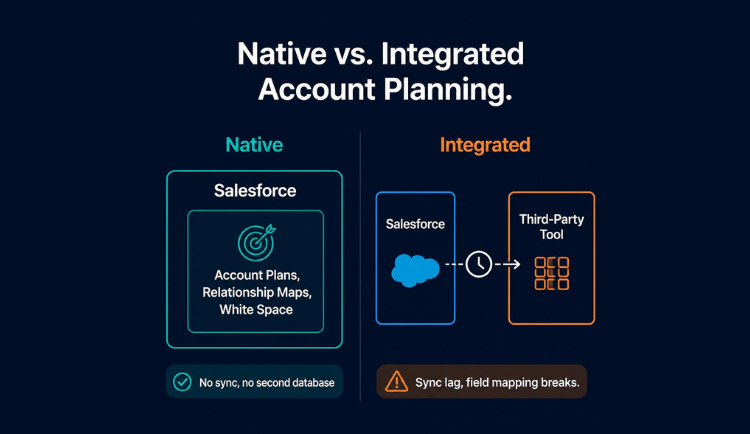
This is the single most important factor for Salesforce centric organizations. A natively built application installs from the AppExchange, uses Salesforce security and permissions, and reads and writes objects directly with no middleware. Integrated tools that sync data through APIs introduce latency, break during upgrades, and create a second system to administer. If your CRM is Salesforce, prioritize native architecture above almost everything else.
Relationship and white space mapping
Strong platforms let you build org charts and relationship maps that show reporting lines, influence, and sentiment. They surface white space by comparing what an account owns against your full product catalog. These features turn vague account knowledge into a visual map that any rep or manager can read in seconds.
Adoption and time to value
The most powerful platform is worthless if sellers will not use it. Look for tools that minimize manual data entry, fit into existing workflows, and deliver value in the first few weeks. Implementation that takes six months and requires a dedicated consultant is a red flag for adoption.
The Leading Account Planning Vendors Compared
Here is how the major players in the category stack up. Each has strengths and a natural fit profile.
Prolifiq CRUSH
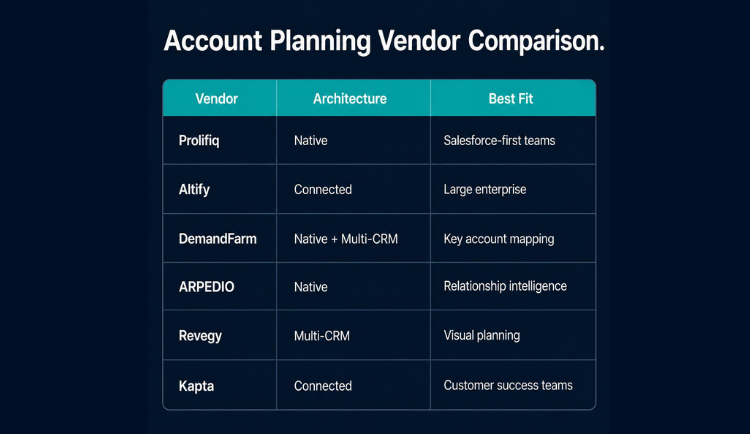
Prolifiq CRUSH is built 100 percent native on Salesforce. There is no separate platform, no external database, and no sync layer. Account plans, relationship maps, white space analysis, and action plans all live inside Salesforce using its native objects and security. This means zero data latency, no integration maintenance, and a familiar interface for reps who already live in the CRM. CRUSH is strong in life sciences, financial services, manufacturing, and technology where Salesforce is the system of record and security requirements are strict. It is the right choice for teams that want fast adoption and a single source of truth.
Altify
Altify, now part of Upland Software, is one of the oldest names in the category. It offers account planning, opportunity management, and relationship mapping with a strong methodology foundation. It is Salesforce connected and capable, but larger and heavier to implement. It tends to fit large enterprises that want a comprehensive methodology platform and have the resources for a longer rollout.
DemandFarm
DemandFarm focuses heavily on key account management with strong org charting and white space visualization. It is available natively on Salesforce as well as for other CRMs. It is a solid choice for teams whose primary need is account mapping and expansion planning, though some buyers find the breadth of features requires significant configuration.
ARPEDIO
ARPEDIO is a Salesforce native platform with strength in relationship mapping and stakeholder management. It emphasizes the political and relationship side of complex deals. It is a credible option for teams that prioritize relationship intelligence and want native architecture.
Revegy
Revegy offers account planning, opportunity planning, and value mapping with strong visualization tools. It is methodology friendly and works across CRMs. It fits enterprises that want detailed visual planning across both account and deal levels.
Kapta
Kapta is built specifically for customer success and key account management teams rather than new business sellers. It emphasizes voice of customer, account health, and growth planning. It is the right fit for organizations where the account planning need sits with post sale teams rather than acquisition.

Curious what native account planning looks like inside your own Salesforce org? Book a demo of Prolifiq CRUSH and see account plans, relationship maps, and white space analysis running on live data, no sync layer required.
Pricing, ROI, and Native vs. Integrated Architecture
Pricing benchmarks
Pricing in this category is almost always per user per month, billed annually, and rarely published openly. Based on market benchmarks, expect to pay roughly 25 to 75 dollars per user per month for account planning software depending on the vendor, the feature tier, and your seat count. Enterprise deals with hundreds of seats negotiate lower per seat rates, while smaller deployments pay closer to the top of the range.
Watch for the hidden costs. Some vendors charge separately for implementation services that can run 15,000 to 50,000 dollars or more for complex rollouts. Others require ongoing professional services to maintain configurations. Native Salesforce platforms tend to have lower implementation overhead because they use your existing CRM administration rather than standing up a parallel system. When you build your business case, model total cost of ownership across three years including license, implementation, and internal admin time, not just the headline per seat price.
How to justify the investment
The business case is straightforward when you anchor it to revenue. If your top 50 accounts generate the majority of your revenue, even a small improvement in retention or expansion in those accounts dwarfs the software cost. A platform that prevents a single major account from churning, or that surfaces one significant cross sell, typically pays for itself for the year.
Native versus integrated: why it matters so much
This deserves its own section because it is the most common point of confusion in vendor selection. Many vendors claim Salesforce integration. Few are truly native. The difference is architectural and it has real consequences.
A native application is built on the Salesforce platform itself. It uses Salesforce objects, Salesforce security, and the Salesforce user interface. When your admin adds a field or changes a permission, the application respects it automatically. There is no data sync because there is no second database. The account plan is Salesforce data.
An integrated application is a separate product that connects to Salesforce through an API. It maintains its own database and syncs data back and forth on a schedule. This works, but it introduces failure points. Syncs lag. Field mappings break during Salesforce releases. Your security model has to be replicated and maintained in two places. And your reps have to context switch between two interfaces.
For organizations in regulated industries like life sciences and financial services, native architecture is often a compliance requirement, not just a preference, because keeping sensitive data inside the Salesforce security perimeter is simpler to govern and audit.
Avoiding Rollout Mistakes and Choosing Your Fit
Common implementation mistakes to avoid
Even good software fails when rolled out poorly. The most common mistake is treating account planning as a tool deployment rather than a process change. Buying the software is the easy part. Getting sellers to change how they plan accounts is the hard part.
Avoid these traps. Do not try to roll out to everyone at once. Pilot with a small group of strategic account managers, prove value, and expand. Do not over configure. Start with a simple plan template and add complexity only when the team asks for it. Do not skip manager enablement. If managers do not use the dashboards and reference plans in their QBRs and one on ones, reps will treat the tool as busywork. And do not measure success by usage alone. Tie the rollout to revenue outcomes in your target accounts so leadership sees the connection.

Which platform fits your team
The right choice depends on your motion. If you are a Salesforce centric organization that wants native architecture, fast adoption, and a single source of truth, Prolifiq CRUSH is the strongest fit, especially in life sciences, financial services, manufacturing, and technology. If you want a heavy methodology platform and have the resources for a long rollout, Altify is worth evaluating. If your primary need is key account mapping and you may use multiple CRMs, DemandFarm and Revegy are credible. If relationship intelligence is your priority and you want native architecture, ARPEDIO competes well. And if the need sits with customer success teams, Kapta is purpose built for that.
FAQs
What is the difference between account planning and CRM?
Your CRM stores account and contact records and tracks activity and pipeline. Account planning software adds strategy on top of that data. It helps you decide which accounts to invest in, who to build relationships with, and where to expand. Native account planning tools like Prolifiq CRUSH use your CRM data as the foundation rather than duplicating it.
How long does implementation take?
It varies widely. Native Salesforce platforms can often be deployed in a few weeks because they use existing CRM administration. Heavier integrated platforms can take three to six months when they require data mapping, sync configuration, and methodology setup. Phased rollouts with a pilot group reach value faster than big bang deployments.
How much does account planning software cost?
Most vendors price per user per month, billed annually, in the range of 25 to 75 dollars depending on tier and seat count. Factor in implementation fees and ongoing administration when modeling total cost. Enterprise deals with high seat counts negotiate lower per seat rates.
Do we need account planning software if we already use a sales methodology?
Yes. A methodology like MEDDIC or strategic selling is a framework. Software is what operationalizes that framework so it gets used consistently across the team and stays current. Without software, methodologies live in training decks and fade within a quarter.
What makes Salesforce native important?
Native architecture means the application lives inside Salesforce using its objects and security with no separate database or sync layer. This eliminates data latency, reduces maintenance, simplifies compliance, and improves adoption because reps stay in the system they already use.
Who should own account planning software internally?
Revenue operations typically owns the platform and configuration, sales enablement owns adoption and training, and sales leadership owns accountability through reviews. Success requires all three. A tool owned by IT with no business sponsor almost always fails.
Are account planning tools worth it for smaller sales teams?
Yes, if you have a defined set of strategic or key accounts, even a small team benefits from a lightweight account planning tool. The value comes from consistency and visibility, not headcount. Smaller teams should prioritize fast time to value over feature breadth.
The best account planning software is the one your team will actually use and that protects and grows revenue in your most important accounts. For Salesforce centric revenue teams, that almost always means a native platform that keeps strategy and data in one place, drives adoption through a familiar interface, and turns account knowledge into a durable company asset rather than something that lives in a rep's head.
Prolifiq CRUSH is built 100 percent native on Salesforce. There is no separate platform to manage, no sync to break, and no second login for your sellers. Account plans, relationship maps, white space analysis, and action plans all live inside the CRM where your team already works. That is why revenue teams in life sciences, financial services, manufacturing, and technology choose CRUSH to plan and grow their strategic accounts. For the Salesforce-specific version of this comparison, see the complete guide to Salesforce account planning.
See how CRUSH turns your account strategy into measurable revenue. Book a demo.