Key account management software helps revenue teams plan, grow, and keep their most important accounts. It sits on top of your CRM and tracks what the CRM does not: who the stakeholders are, which products each account has not bought yet, and the multi-quarter plan to expand revenue. If you are comparing vendors, this guide covers what the software should do, how the main options differ, what they cost, and how to roll one out.
It is written for revenue operations leaders, sales VPs, and account management directors at Salesforce-centric companies. For the broader category (including account management software that is not built around strategic accounts), see our account management software guide. For the buying shortlist by use case, see best account planning software.
%20copy.png)
What Key Account Management Software Does
Most B2B companies earn the majority of their revenue from a small set of accounts. A CRM tracks opportunities and forecasts. Key account management (KAM) software tracks the strategic context around those opportunities. A serious platform covers four things:
- Relationship and influence mapping: who the decision makers, champions, and detractors are in each account. See relationship mapping.
- White space analysis: which products and business units you have sold into and which you have not. See white space analysis.
- Account planning workflows: the plan broken into tasks with owners and dates, on the account record. See key account management planning.
- Portfolio reporting: account plans rolled up so leadership can see health, risk, and expansion across all key accounts.
Vendors call this a platform, a tool, or an app. The label tells you little. What matters is whether it runs inside Salesforce or pulls your reps into a second system. Opportunity management asks whether a deal closes this quarter. Account management asks how a two million dollar account becomes a ten million dollar account over three years. The best software connects both on the same record.
Why Salesforce-Native Matters for Adoption
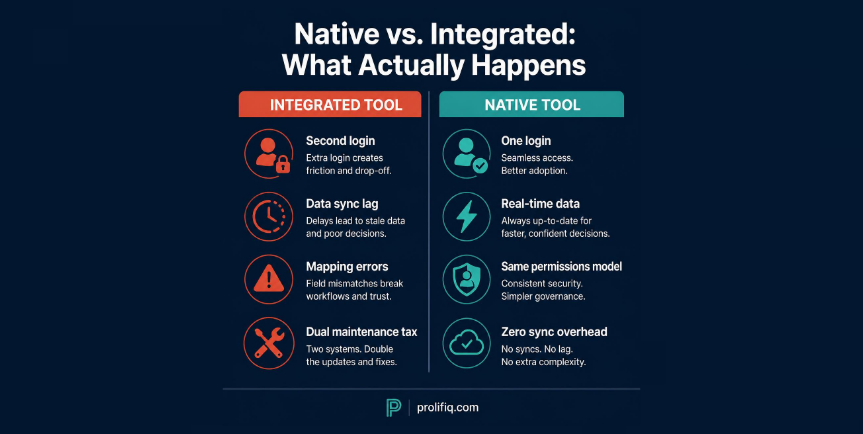
Adoption decides whether this category pays off. If reps need a second login, a second source of truth, and a second place where data goes stale, they stop updating the plan within a quarter.
A tool that integrates with Salesforce syncs data back and forth, which brings lag, mapping errors, and the question of which system is right. A native tool runs inside Salesforce, reads and writes the same records your reps already maintain, and follows the permissions and security model your admin configured. When the account plan sits next to the opportunity, the contact, and the activity history, planning stops being extra work.
Non-native tools also carry costs that do not appear on the invoice: your admin maintains the integration, reps reconcile discrepancies, and reports that pull from two systems never quite agree. Native tools avoid this because there is one system. Note that "native" is now claimed by several vendors, including DemandFarm and ARPEDIO, so it is a minimum requirement, not a differentiator. Ask each vendor whether plans are stored as Salesforce objects and whether data leaves your org.
Key Account Management Software Compared
Here is how the main vendors differ. Features and pricing come from each vendor's public materials and were last checked in October 2026. Where a vendor does not publish pricing, the table says quote-based.
Prolifiq CRUSH
CRUSH runs fully inside Salesforce, so account planning, relationship mapping, and white space analysis live on the records reps already use. It is strongest in complex and regulated industries such as life sciences, financial services, and manufacturing, where the Salesforce security model matters. The pitch is simplicity and adoption: no second system, a short time to value, and prices published on the site.
Altify
Altify is one of the oldest names in the category and carries a heavy sales methodology heritage (Target Account Selling) with coaching and enablement services. It suits organizations that want a formal methodology built into the tool. The tradeoff is breadth: teams that only need planning and mapping may find the framework more than they need.
DemandFarm
DemandFarm focuses on visual account intelligence, org charts, and white space. It is Salesforce-native and also supports other CRMs, and it lets teams configure frameworks such as MEDDIC and SPIN. Ask which edition you would get and how it fits your CRM.
ARPEDIO, Revegy, and Kapta
ARPEDIO is built on Salesforce and emphasizes stakeholder mapping, so it belongs on the shortlist if native is a hard requirement. Revegy offers visual opportunity planning for large enterprise accounts, but it was acquired by Dura Software in 2022, so confirm current availability and support before shortlisting. Kapta leans toward post-sale account management and customer success, with voice-of-customer tracking.
Pricing and features change, so confirm with each vendor before you buy. For head-to-head detail, see CRUSH vs DemandFarm, CRUSH vs Altify, CRUSH vs Revegy, CRUSH vs ARPEDIO, and CRUSH vs Kapta.

What Key Account Management Software Costs
Most vendors in this category hide pricing behind a sales call, which is itself a signal. Prolifiq publishes its prices: CRUSH is $54 per user per month and the Relationship Map module is $27 per user per month. Published figures for other native tools run in a similar range, while enterprise platforms with a methodology layer are typically quoted individually and sit higher.
The quote is not the full cost. Ask every vendor:
- Is pricing per seat or platform based, and what is the minimum?
- What does implementation cost for your seat count, and is training included?
- What is the renewal escalator?
- What happens to your data and configuration if you leave?
Native tools often cost less over three years because there is no integration to maintain and no second system to run.
Features That Drive Adoption (and Mistakes to Avoid)
Demos show impressive features nobody uses. Weight these four in your evaluation:
- Fast relationship mapping. If updating the map feels like data entry, it goes stale in a month. Outside contact data from sales intelligence software can supply names, but only your team knows where each person stands.
- White space that stays current. A product-by-business-unit grid is the most actionable view in account planning because it points to the next deal.
- Plans that are living tasks. An account plan stored as a slide deck is presented once and forgotten. The plan and the work should be the same record.
- Simple weekly use. Teams that win plan weekly and monthly, not once a year.
The most expensive buying mistakes are choosing for the demo instead of for adoption, skipping change management, and treating planning as an annual event. A modest tool that reps use beats a powerful one that sits idle.
Building the Business Case and Rollout Plan
Frame the investment around retention and expansion, not productivity. Strategic accounts are where churn costs most and expansion is most achievable. As an example, if your top 50 accounts represent $40 million in revenue and the software improves retention and expansion by 3 percent, that is $1.2 million in protected and new revenue. Replace those numbers with your own before presenting to finance.
Questions your CFO will ask
- What revenue sits in the accounts we would manage with this tool, and what is our current retention and expansion rate on them?
- What does the first year cost in licenses, implementation, and admin time?
- How will we know it is working in 90 days? Pick two or three measures, such as plan completion rate, number of mapped stakeholders per key account, and white space opportunities created.
Rollout plan
Native tools generally deploy faster because there is no integration to build. Plan a phased rollout: start with one team or segment of strategic accounts, prove value, then expand. Rolling out to the whole field on day one produces uneven adoption. Build the account plan and the first white space view in the pilot, and review them in your weekly account meeting.
Frequently Asked Questions
What is the difference between a CRM and key account management software?
A CRM manages pipeline and forecasting across all accounts. Key account management software adds the strategic layer for your most important accounts: relationship mapping, white space analysis, multi-year planning, and portfolio reporting. The best tools run inside your CRM rather than replacing it.
How much does key account management software cost?
Prolifiq CRUSH is $54 per user per month and the Relationship Map module is $27. Most other vendors quote pricing individually. Ask about implementation, training, and renewal escalators, not only the license.
Is Salesforce-native better than an integrated tool?
For Salesforce-centric teams, usually yes. Native tools remove the second login, the sync lag, and the dual maintenance. Several vendors now claim native, so ask where the data is stored.
Which vendor is best for regulated industries?
Native Salesforce tools inherit your org's security model, which simplifies reviews compared with tools that store data separately. Confirm data residency with each vendor.
How long does implementation take?
Native platforms typically reach active use within a few weeks. Standalone platforms with methodology and integration work usually take longer. A phased rollout starting with one team is the fastest path to adoption.
How do I make sure my reps use it?
Pick a tool that lives in Salesforce, keep updates quick, tie planning to an existing weekly or monthly meeting, and assign an owner for rollout.
Prolifiq CRUSH is built natively on Salesforce, so account plans, relationship maps, and white space analysis sit on the records your reps already use. See CRUSH or compare it with the other best account planning software.