Most enterprise deals do not die because the product was wrong. They die because the sales team mapped the wrong people, missed a hidden decision maker, or assumed a friendly contact had more influence than they actually held. In a typical enterprise B2B purchase, Gartner research shows 6 to 10 stakeholders are involved, and that number climbs higher in regulated verticals like life sciences and financial services. When you cannot see who matters, who blocks, and who quietly signs off, you are flying blind.
A relationship mapping template fixes that. It is a structured way to capture every person connected to an account, score their influence, document their attitude toward your solution, and chart the political reporting lines that org charts never reveal. Done well, it turns a tangle of names into a clear picture of how a decision actually gets made. Done poorly, or not at all, it leaves your forecast resting on hope.
This guide gives you a complete, field by field relationship mapping template you can build today, plus the logic behind each component. We cover what to capture, how to score influence and sentiment, how to map power lines and coalitions, and how to keep the map current inside your CRM instead of letting it rot in a forgotten slide. Whether you sell into a 4 person buying committee or a 12 person procurement gauntlet, the structure below scales. By the end you will know exactly what fields to include, how to read the map, and how to act on what it tells you.
This download includes both a deal-scoped template, for a single active opportunity, and an account-scoped template for the account as a whole, spanning past and future deals. Both include an automatic single-threaded coverage flag so you can see your biggest risk at a glance. Download the free relationship mapping template
What a Relationship Mapping Template Actually Is
A relationship mapping template is a repeatable framework for documenting the people inside a target account and the connections between them. It goes beyond a contact list. A contact list tells you names, titles, and emails. A relationship map tells you who reports to whom, who influences whom, who supports your deal, who opposes it, and who has the authority to say yes or no.
The template forces consistency. When every account in your pipeline uses the same fields and the same scoring scale, managers can compare maps across deals, spot coverage gaps, and coach reps on weak spots. Without a template, every rep maps relationships their own way, and the data becomes useless the moment that rep leaves.
At its core, the template answers three questions. First, who are the people that matter? Second, how do they relate to each other and to you? Third, what is your plan to engage them? Most teams nail the first question and ignore the other two. That is the gap this template closes.
The Core Fields Every Template Needs
Start with the building blocks. Each stakeholder record in your relationship mapping template should include the fields below at minimum.
Identity and Role Fields
Capture full name, job title, department, and the business unit they belong to. Add their formal role in the buying process: economic buyer, technical buyer, user buyer, coach, or executive sponsor. These roles come from classic methodologies like Miller Heiman and remain the cleanest way to label function. A person can hold more than one role, so allow multiple selections.
Influence and Authority Fields
Add a field for decision authority on a simple scale: final approver, strong influencer, contributor, or no say. Separately, capture organizational influence, which is informal power that does not match the title. A senior engineer with the CTO's ear may outrank a VP on paper.
Sentiment Fields
Document attitude toward your solution: champion, supporter, neutral, skeptic, or blocker. This single field changes how you sequence outreach. Pair it with a confidence level so reps note how sure they are about that read.
Mapping Influence and Authority Separately
One of the most common mistakes in relationship mapping is conflating title with power. The org chart shows reporting lines. It does not show influence. A relationship mapping template should treat authority and influence as two distinct dimensions, because the most dangerous stakeholders are the ones with high influence and no obvious title.
Use a two by two grid in your head. On one axis, plot formal authority, meaning the power to approve a budget or sign a contract. On the other axis, plot informal influence, meaning the ability to sway the people who hold authority. The four quadrants tell you how to act. High authority and high influence is your decision maker, and you should be in constant contact. High influence and low authority is your kingmaker, often a trusted advisor who can make or break the deal behind closed doors. High authority and low influence is a figurehead who rubber stamps what others decide. Low on both is a contact you maintain but do not over invest in.
Score each person on both dimensions using a one to five scale. The numbers let you sort and filter. When a manager reviews a deal, they can instantly see whether the rep has relationships with the high authority, high influence quadrant or only with friendly low power contacts. That single view exposes the most common reason deals stall: the team is talking to people who cannot say yes.
Charting Reporting Lines and Power Lines
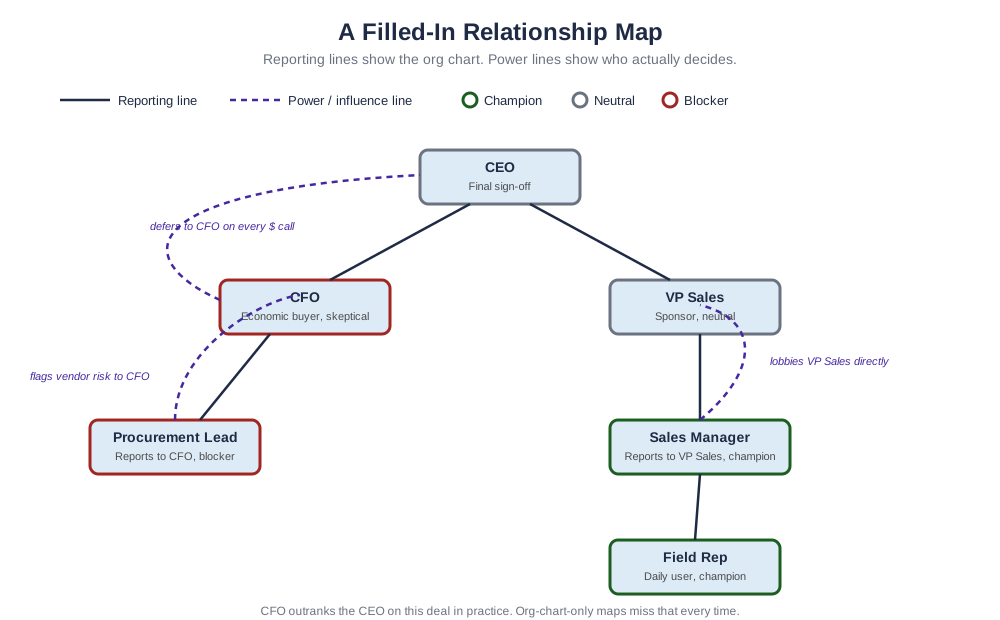
Two types of lines matter on a relationship map. The first is the reporting line, which follows the formal org chart. The second is the power line, which traces real influence regardless of hierarchy. Your template should let you draw both.
Reporting lines give you structure. They tell you the chain of command and help you understand who needs to be informed when a decision moves up. But power lines tell you the truth. The CFO may report to the CEO, but if the CEO defers to the CFO on every financial decision, the power flows the other way for your deal.
Solid Lines Versus Dotted Lines
Use solid lines for direct reporting relationships and dotted lines for influence relationships. A dotted line might connect a procurement lead to a business unit head who has no authority over procurement but heavily shapes their priorities. Mapping these dotted lines is where reps earn their commission. It is the difference between knowing the org and understanding the politics.
Coalitions and Blocking Groups
People rarely decide in isolation. They form coalitions. Your template should let you tag groups of stakeholders who tend to align: the security team that always pushes back, the operations group that champions efficiency, the finance bloc that guards the budget. Identifying these coalitions early lets you build counter coalitions of supporters before a blocker rallies opposition.
Scoring Stakeholder Sentiment
Sentiment is the fastest way to read deal health. Map every stakeholder on a five point scale from blocker to champion. Then count. If you have two champions, four neutrals, and one blocker, you have work to do, but you have a foundation. If you have one champion and three skeptics, your deal is in trouble no matter what the rep tells the forecast call.
The power of sentiment scoring shows up when you weight it by influence. A champion with low influence is nice but not decisive. A skeptic with high authority is an emergency. Combine the sentiment field with the influence score and you get a weighted view of where the account really stands. Many teams build a simple health indicator that turns red when high influence stakeholders trend negative.
Update sentiment after every meaningful interaction. A demo that went badly should shift a supporter toward neutral. A reference call that landed should push a skeptic toward supporter. Sentiment is not a one time entry. It is a living read that should change as the relationship develops.
A Field by Field Relationship Mapping Template
Here is the complete template structure to copy. Build it as columns in a spreadsheet or, better, as fields in your CRM.
Stakeholder name. Title. Department and business unit. Buying role, allowing multiple values. Decision authority, scored one to five. Organizational influence, scored one to five. Sentiment, from blocker to champion. Confidence in sentiment read. Reports to, linking to another stakeholder record. Influenced by, linking to one or more records. Coalition or group tag. Owned by, meaning which rep holds the relationship. Last meaningful contact date. Engagement plan, a short note on the next action. Key motivations, capturing what this person cares about personally and professionally. Known objections. Personal connections, such as shared history with a competitor or a prior vendor relationship.
That last cluster of fields is what separates a strong template from a basic one. Motivations and objections turn a static map into a playbook. When a rep can see that the CFO cares about reducing audit risk and the security lead objects to data residency, they can tailor every conversation instead of pitching the same deck to everyone.
Where Most Relationship Maps Fail
The biggest failure is staleness. A relationship map built once during the discovery phase and never touched again is worse than no map, because it gives false confidence. People change roles. Champions leave. New stakeholders join the committee. A map that does not update with the account is a liability.
The second failure is living outside the system of record. When relationship maps live in slide decks, whiteboards, or a rep's personal spreadsheet, they vanish the moment that rep is out sick or quits. The data never reaches the manager, never informs the forecast, and never transfers to the next owner. Maps must live where the deal lives, which for Salesforce centric organizations means inside the CRM.
The Single Threaded Deal Trap
A third failure is relying on one relationship. Single threaded deals, where the entire account hinges on one friendly contact, are the most common reason forecasted deals slip. A good template makes single threading visually obvious. If only one stakeholder has a relationship owner and a positive sentiment, the map screams risk. The fix is multithreading: deliberately building relationships across the buying committee so no single departure sinks the deal.
How Relationship Mapping Fits Account Planning
Relationship mapping is one pillar of account planning, not a standalone exercise. A complete account plan ties the relationship map to whitespace analysis, opportunity tracking, and a set of next actions. The map tells you who. The plan tells you what to do about it.
The strongest revenue teams review the relationship map in every account plan session. They ask whether coverage matches the deal size, whether champions are being developed, and whether blockers are being neutralized. The map becomes the agenda for coaching. Instead of asking a rep how a deal feels, a manager can point at the map and ask why there is no relationship with the economic buyer who controls the budget.
Building Versus Buying Your Template
You can build a relationship mapping template in a spreadsheet for free. For a small team running a handful of deals, that may be enough to start. The trade off is manual maintenance, no integration with deal data, and no automatic alerts when a stakeholder goes quiet.
Purpose built tools change the equation at scale. Vendors like Altify, DemandFarm, ARPEDIO, Revegy, and Prolifiq offer relationship mapping inside account planning platforms. The advantage is that the map connects to live CRM data, updates as contacts change, and surfaces gaps automatically. Pricing for these tools typically ranges from roughly 25 to 100 dollars per user per month depending on the platform and the breadth of account planning features included. For enterprise teams managing six and seven figure deals across dozens of accounts, the cost of a missed stakeholder dwarfs the cost of the software.
Frequently Asked Questions
What is a relationship mapping template?
It is a structured framework for documenting every stakeholder in a target account, including their role, decision authority, informal influence, sentiment toward your solution, and how they connect to each other. It turns a contact list into a picture of how decisions actually get made.
What fields should a relationship mapping template include?
At minimum, capture name, title, department, buying role, decision authority, organizational influence, sentiment, reporting lines, influence lines, relationship owner, last contact date, and an engagement plan. Add motivations and objections to make the map actionable.
How is influence different from authority?
Authority is the formal power to approve a budget or sign a contract. Influence is the informal ability to sway the people who hold authority. A senior advisor with no title can have more influence than a VP. Score them separately so you do not over invest in figureheads.
How often should you update a relationship map?
Update it after every meaningful interaction and review it in every account plan session. People change roles and sentiments shift, so a map that is not maintained quickly becomes misleading and gives false confidence.
What is multithreading and why does it matter?
Multithreading means building relationships across several stakeholders rather than relying on one contact. It protects the deal if a champion leaves and gives you coverage across the buying committee. Single threaded deals are among the most common reasons forecasts slip.
Should relationship maps live in the CRM?
Yes. Maps stored in slides or personal spreadsheets disappear when a rep leaves and never inform the forecast. Keeping the map in your system of record makes it visible to managers, transferable to new owners, and connected to live deal data.
Bring Your Relationship Maps Into Salesforce
A relationship mapping template only delivers value if it stays current and lives where your deals live. Prolifiq CRUSH is built natively on Salesforce, so your relationship maps, influence lines, and sentiment scores sit right next to the opportunity data your team already manages. No exports, no stale slides, no maps trapped on a single rep's laptop. CRUSH lets you chart power lines, flag single threaded deals, score stakeholders, and surface coverage gaps automatically, all inside the platform your revenue team works in every day. If you are ready to turn relationship mapping from a one time exercise into a living part of your account planning, explore Prolifiq CRUSH and see how Salesforce native mapping helps your team win complex enterprise deals.