An account list builder is a tool or process that identifies, scores, and organizes the companies a B2B team should sell to. The output is a target account list: a short, ranked set of named accounts that sales and marketing work together instead of chasing every lead that comes in.
This guide shows how to build a target account list in six steps, where the data comes from, how to choose an account list builder, and what to do once the list exists.
What Is an Account List Builder?
An account list builder is software or a repeatable process that turns your ideal customer profile into a ranked list of named target accounts. It pulls company data (industry, size, tech stack, buying signals), filters it against your criteria, and sorts the results so the best-fit accounts come first.
You will see the terms target account list, named account list, and simply "account list" used almost interchangeably. In practice they all mean the same output: the specific companies your team has agreed to pursue.
Account list vs. contact list
A contact list is a set of people. An account list is a set of companies. The distinction matters because B2B deals are decided by groups. A Gartner survey of 632 B2B buyers found buying groups range from five to 16 people. Starting from the account, and then identifying the people inside it, keeps you from over-investing in one contact at a company that was never a fit.
When you need an account list builder
Most teams reach for one when any of these is true:
- Reps spend more time deciding who to call than calling
- Marketing and sales disagree about which accounts matter
- Your best customers share traits no one has written down
- Pipeline depends on a few large deals and you need more of them
If you are still working out which strategy to run, start with our guide to target account selling and come back here for the list itself.
How to Build a Target Account List in Six Steps
This process works with a spreadsheet, your CRM, or a dedicated account list builder. The steps stay the same.
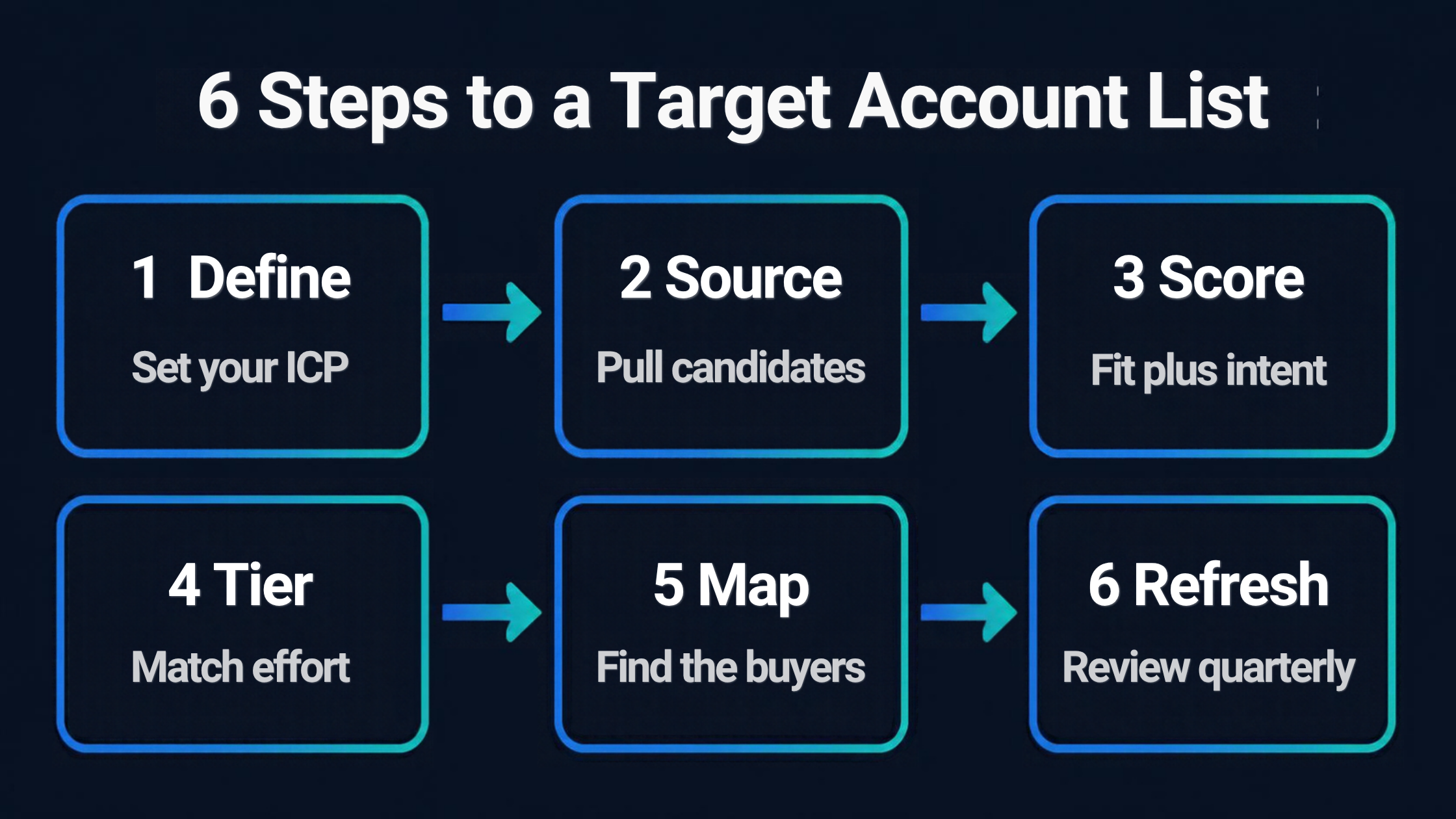
Step 1: Define your ideal customer profile
Start with your best existing customers, not with a data vendor. Look at the accounts with the highest retention, fastest sales cycles, and most expansion, and write down what they share: industry, company size, geography, tech stack, and the problem they were solving when they bought. Our ideal customer profile template walks through the fields.
Step 2: Source candidate accounts
Pull every company that matches your firmographic basics. Good sources include your CRM (including closed-lost and dormant accounts), a data provider, partner referrals, and competitor customer lists you can legitimately see. Aim wide here and narrow in the next step.
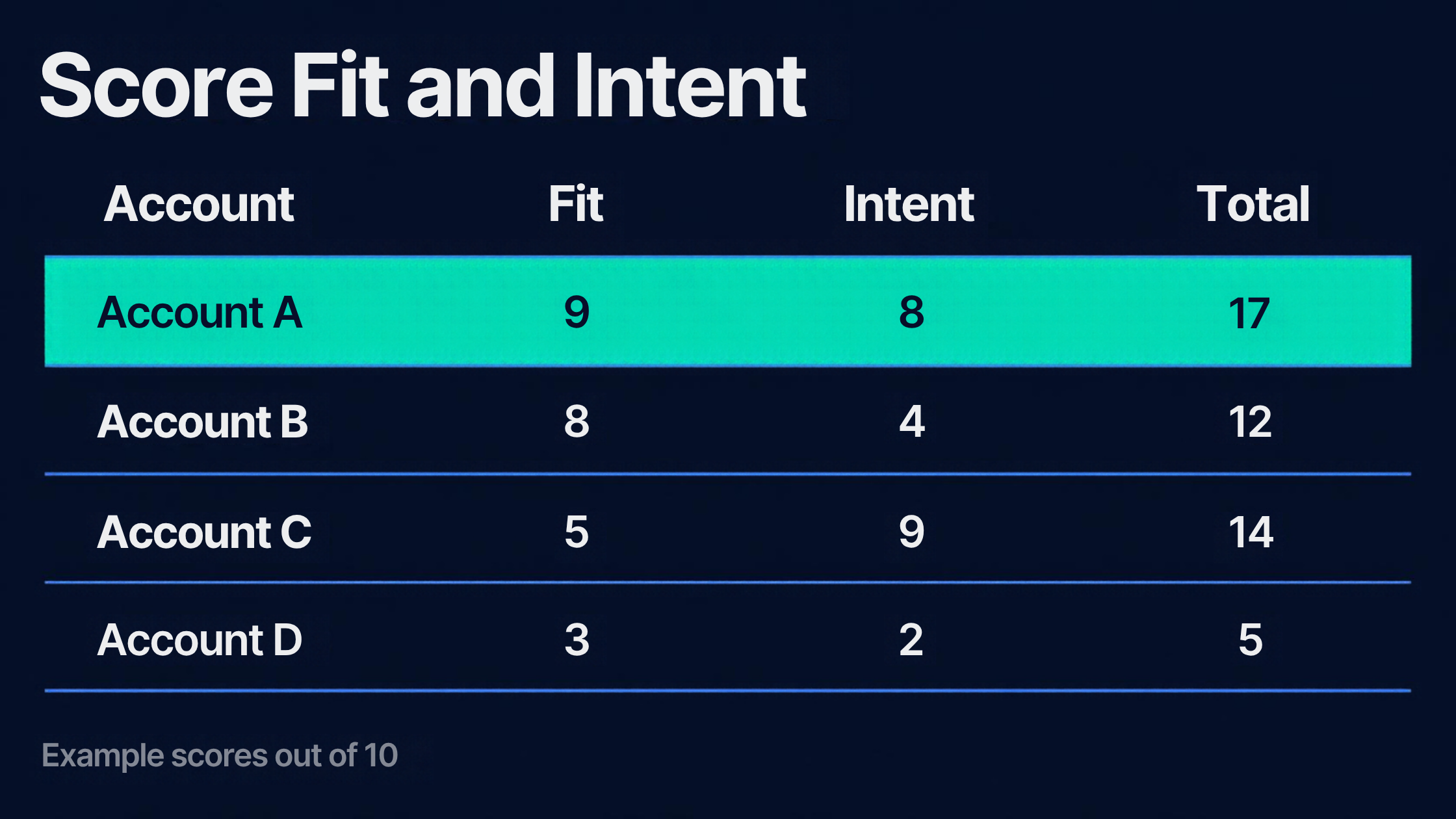
Step 3: Score fit and intent
Give each account two scores. Fit asks whether the company looks like your best customers. Intent asks whether there is a reason to talk now, such as a new executive, a funding event, a reorganization, or a competitor contract nearing renewal. Weight fit more heavily at first, because intent signals are noisy and a perfect-timing company that cannot buy from you is not an opportunity.
Step 4: Tier the list
Sort accounts into tiers so effort matches potential. A common pattern is a small top tier that gets one-to-one attention, a middle tier that gets one-to-few programs, and a long tail that gets lighter, scaled outreach. Our guide to account segmentation covers how to set the criteria for each tier.
Step 5: Map the buying group
For each top-tier account, identify the people involved: the economic buyer, the champion, the influencers, and the likely blockers. This is where an account list becomes an account plan. See stakeholder mapping for how to build the map.
Step 6: Review and refresh on a schedule
Lists decay. Companies get acquired, priorities change, and your ICP sharpens as you learn. Review the list every quarter, remove accounts that went cold, and promote the ones that show new signals.
Where Account List Data Comes From
An account list is only as good as the data behind it. Four types of data do most of the work.
- Firmographic: industry, employee count, revenue, location, and growth stage
- Technographic: the software and platforms a company already runs, which tells you about fit and integration needs
- Intent and trigger data: hiring patterns, leadership changes, funding, and content or search behavior
- Your own history: closed-won, closed-lost, and churned accounts, which are often the most predictive source you have
Build a first list inside Salesforce
If your accounts already live in Salesforce, you can build a working first version without buying anything. Create a list view on the Accounts tab and filter by the fields that define your ICP, such as industry, annual revenue, and billing country. Salesforce documents the steps in its account list view module on Trailhead. It will not score intent for you, but it proves out your criteria before you invest in a tool.
How Many Accounts Belong on a Target Account List
The most common mistake is a list that is too long. A list of 2,000 "targets" is a prospect database, not a focus. Size the list to the capacity of the people working it.
A simple capacity formula
Take the selling hours one rep has per quarter, then divide by the hours each tier of account needs. Here is a worked example with illustrative numbers:
- A rep has about 400 selling hours in a quarter
- A top-tier account needs roughly 20 hours of research, planning, and outreach
- A middle-tier account needs roughly 6 hours
- Split 60% of time to top tier and 40% to middle tier: about 12 top-tier accounts and about 27 middle-tier accounts per rep
Your numbers will differ. The point is to let capacity set the size, then adjust as you learn how long each tier really takes.
Three mistakes that quietly kill a target account list
- No owner. Every account needs one named person responsible for it, or the list becomes shared and ignored.
- Static lists. An account list built once and never reviewed goes stale within a few quarters.
- Marketing and sales keep separate lists. Agree on one list, so campaigns and outreach hit the same accounts. Our account based selling guide covers how the two teams work from a shared list.
Choosing an Account List Builder: Tools and What to Look For
Tools in this space fall into four groups, and many teams use more than one.
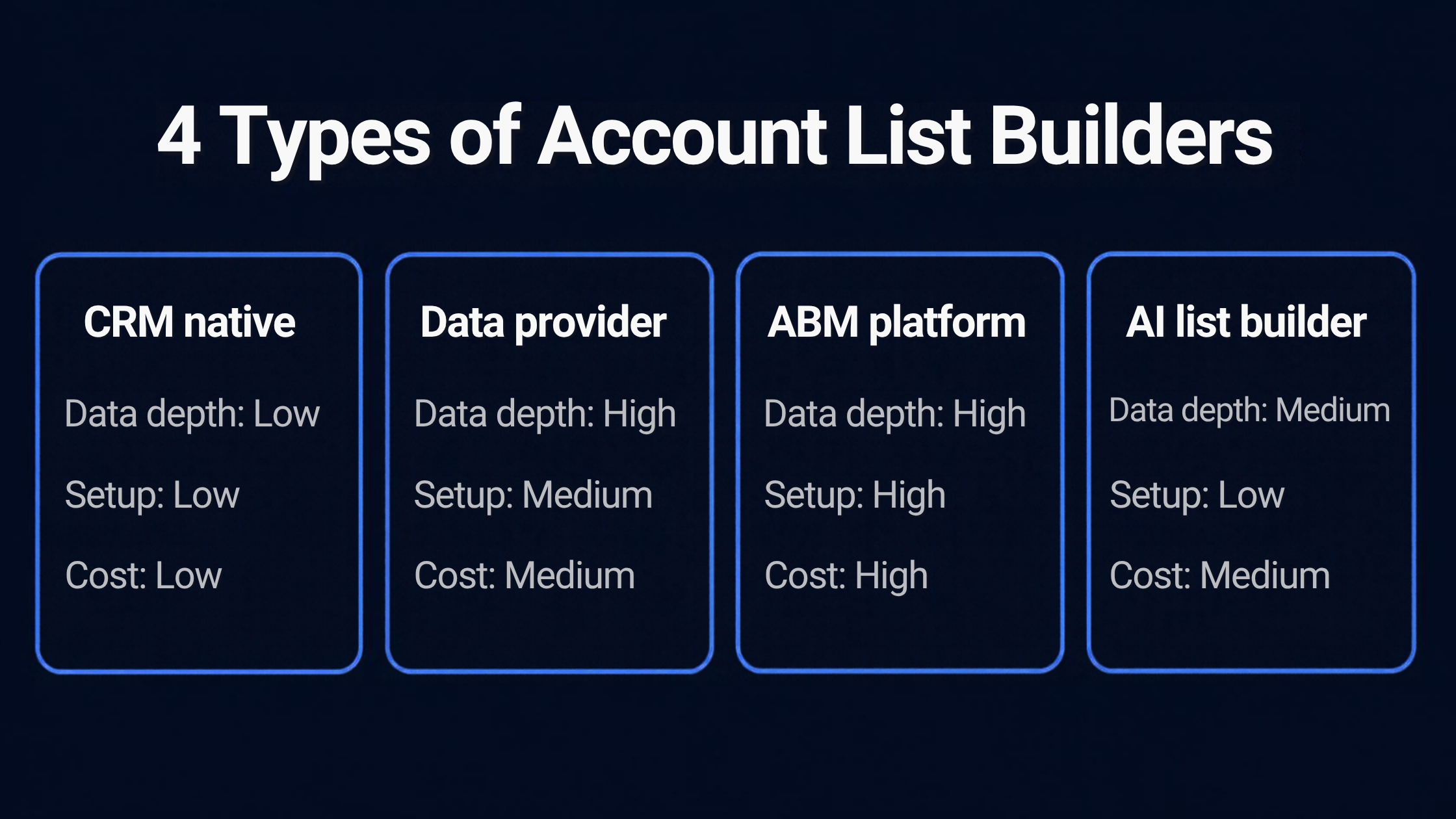
- CRM native: list views, reports, and custom scoring fields in the system you already use. Cheapest, and limited on external data.
- Data providers: large company databases you can filter and export. Strong on firmographic and technographic data.
- ABM platforms: tools such as Demandbase and RollWorks that combine account lists, intent data, and advertising or outreach in one place.
- AI list builders: newer tools that learn from your best customers and propose matching accounts automatically.
For a broader comparison of the platforms, see our guides to account based marketing tools and sales prospecting tools.
A checklist for evaluating any account list builder
- Does it connect to your CRM, so scores and lists sync both ways?
- Can you edit the scoring model, or is it a black box?
- How fresh is the data, and how does it handle companies that merged or closed?
- Does it cover your target region and industries?
- Can it export the list to the tools your reps actually use?
- Does it help with the people inside accounts, or only the company record?
From Account List to Account Plan
A finished list tells you where to focus. It does not tell you what to do inside each account. The next step is a plan for each top-tier account: who the stakeholders are, what each cares about, where your relationships are thin, and what expansion or new-business opportunity you are pursuing.
That is the work account planning covers. Start with account mapping to see how the organization is structured, use white space analysis to find where you can sell more, and keep the plan in the system your reps already use. If that is Salesforce, our guide to Salesforce account planning shows how.
Account List Builder FAQ
What is an account list builder?
An account list builder is a tool or process that identifies and ranks the companies a B2B team should target, based on fit with an ideal customer profile and, often, buying signals.
What is a target account list?
A target account list is the set of named companies a sales and marketing team has agreed to pursue. It is usually tiered, so the best-fit accounts receive the most attention.
How do you build a target account list?
Define your ideal customer profile, source candidate accounts, score them for fit and intent, tier the results, map the buying group at top accounts, and review the list every quarter.
How many accounts should be on a target account list?
It depends on your capacity. A practical method is to divide the selling hours your team has per quarter by the hours each tier of account needs. A small one-to-one tier may hold only a handful of accounts per rep, while a scaled tier can hold hundreds.
What is the difference between an account list and a contact list?
An account list is a set of companies. A contact list is a set of people. Build the account list first, then identify the right contacts inside each account.
Can I build an account list in Salesforce?
Yes. A filtered list view on the Accounts tab is a good starting point, and reports and custom scoring fields can extend it. Dedicated tools add external data and intent signals that Salesforce does not provide on its own.
How often should I update my account list?
Review it quarterly at a minimum, and refresh sooner after a major change such as a new product, a new market, or a shift in your ideal customer profile.
The strongest account lists are short, ranked, and owned by someone. Start with your ICP, score honestly, tier by potential, and keep reviewing. If you want to see how a ranked account list becomes a plan inside Salesforce, we can walk you through it.