
What QBR software actually has to do
Strip away the marketing and there are four jobs. Most tools do one or two well and gesture at the rest.
Pull the data automatically. The single largest time cost in QBR prep is assembling numbers that already exist somewhere — CRM activity, product usage, support tickets, renewal dates, open pipeline. If your tool can't read those systems directly, you've bought a template, not software.
Enforce a consistent structure. Ten AEs left alone will produce ten different QBRs, and none of them will be comparable quarter over quarter. Good tooling makes the structure the default rather than something a manager has to police.
In practice, that means giving reps a standard account plan template instead of a blank slide. Below is what that looks like in Prolifiq CRUSH — a master account plan with the stakeholder map, deal team, and org structure laid out the same way for every account, so a QBR built from it inherits that structure automatically rather than being assembled from scratch.
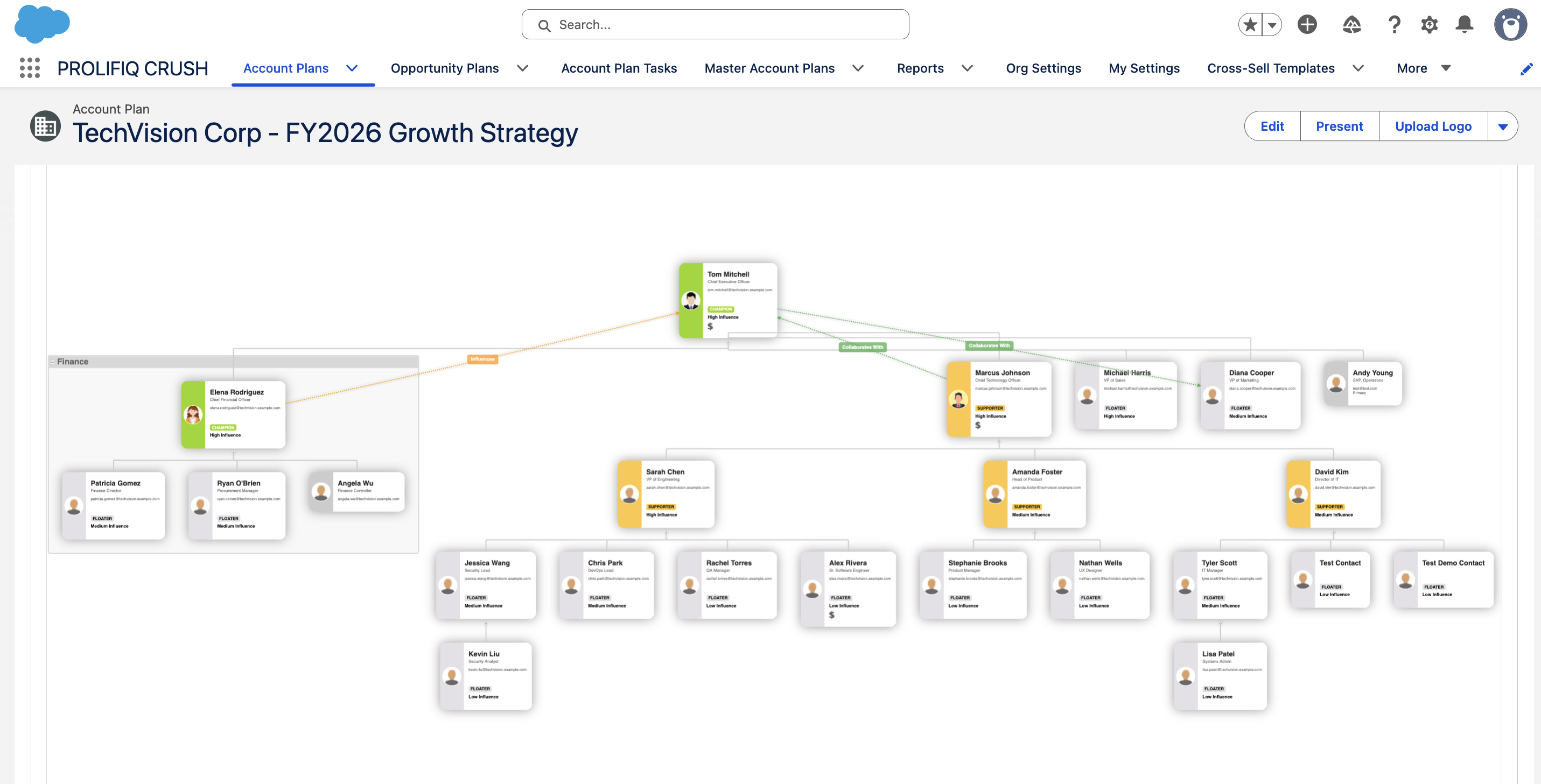
A CRUSH master account plan for TechVision Corp, showing the stakeholder and relationship map that feeds directly into the QBR.
Make the meeting collaborative rather than presentational. A QBR where one side talks for forty minutes is a status update. The tools that earn their cost make it easy for the customer to react to what's on screen — which usually means live data rather than a deck exported the night before.
Track what was committed. This is the job almost everyone skips and the one that determines whether QBRs affect renewals at all. Commitments made in the room need to land somewhere they'll be reviewed before the next QBR, not in someone's notebook.
Score any tool against those four before you look at pricing.
The four categories
Customer success platforms. The most common answer for post-sale teams. These platforms centre on health scores, product usage, and renewal risk, and most ship some form of QBR or business-review generation on top of that data. Best when your QBRs are customer-facing, retention-focused, and the numbers that matter are product usage and support history. The catch: they're priced and scoped as full CS platforms, and they tend to sit outside the CRM, meaning your AEs work in a second system.
Account planning software. Built for the pre-sale and expansion side — strategic account plans, white space analysis, relationship mapping.
Here's what that relationship mapping looks like in practice: an influence chart that plots each stakeholder by how much sway they have and where they land, from blocker to champion, so an AE can see at a glance who's still undecided and who needs to be brought along before the next review.
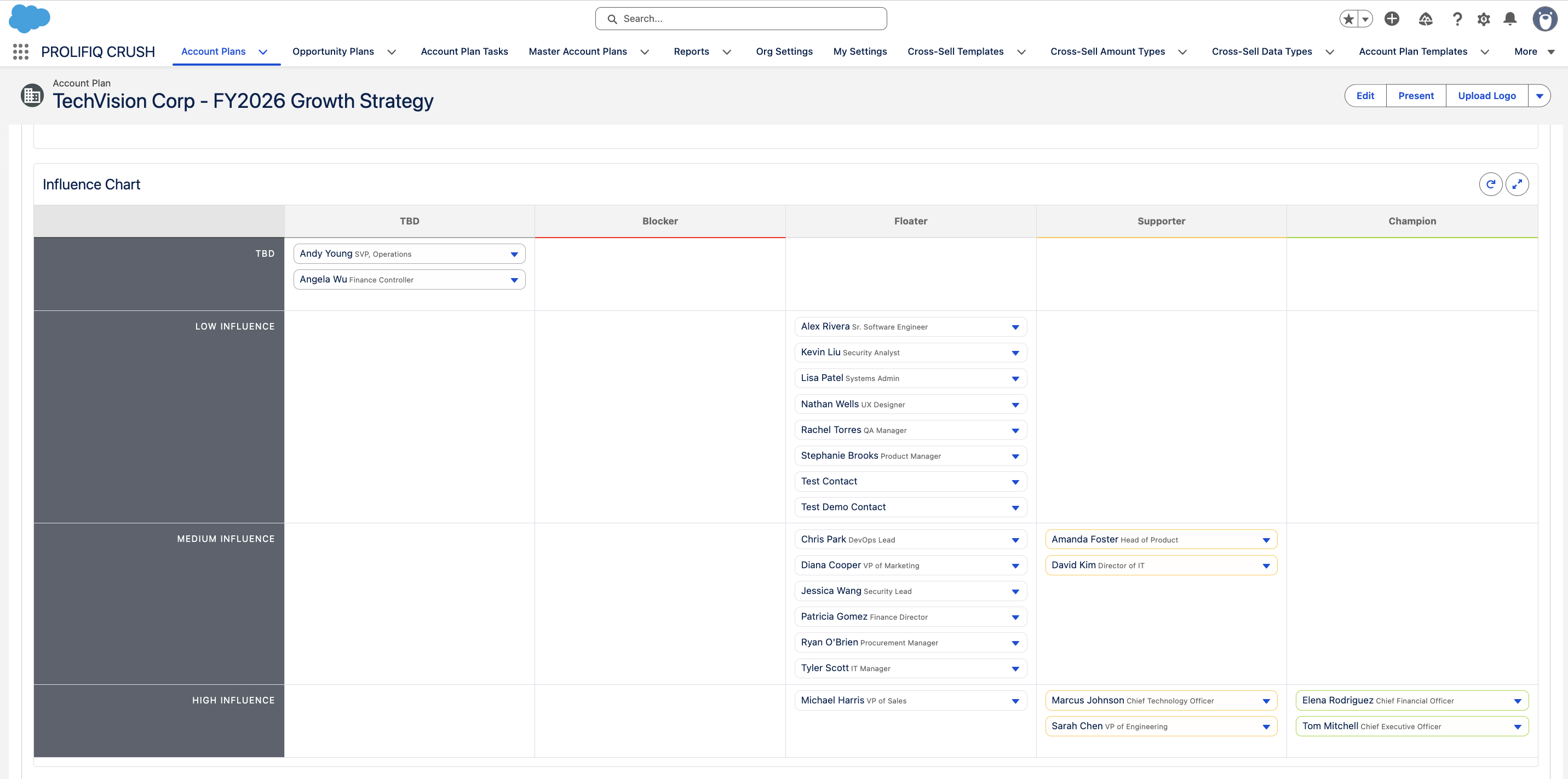
A CRUSH influence chart for TechVision Corp, mapping stakeholders by influence level and disposition.
QBRs come out as a byproduct: if the account plan is current, the business review is mostly a view of it. Best when your QBRs are as much about growth and expansion as retention, and the same reps own both the plan and the meeting. The catch: these tools assume you're actually maintaining account plans — if plans go stale between quarters, the QBR output is stale too.
Deck automation tools. Narrower and often cheaper. These connect to your data sources and generate presentations from templates — the QBR deck builds itself from live data instead of someone rebuilding it each quarter. Best when your process is fine and your only real problem is the hours lost to deck assembly. The catch: they solve the artifact, not the process. You still need somewhere for commitments to live afterwards, and they don't help with the meeting itself.
CRM reports and dashboards. Worth taking seriously rather than dismissing. If your QBR data lives in Salesforce already, a well-built report and dashboard set plus a standing template gets a lot of teams most of the way there for no additional licence cost. Best when you have Salesforce admin capacity, fewer than roughly 50 accounts in the QBR cycle, and a process that's already consistent. The catch: it breaks down at scale and puts the whole thing on one admin's shoulders, and it does nothing for commitment tracking unless you build that too.
What to evaluate
Once you've narrowed to a category, these questions separate tools in practice.
Where does the data come from, and how fresh is it? Ask specifically whether the integration is native, via a middleware connector, or a scheduled export. Native beats connector beats export, and the difference shows up as staleness in the room.
How much does a QBR cost to produce after setup? Every vendor demos the finished output. Ask instead how long the second QBR takes once templates are configured — that's the number your team lives with.
Who has to be in the tool? If only CS or only sales has seats, you've rebuilt the silo the QBR was meant to close. Check per-seat pricing against everyone who'd realistically need access, including the AE who owns expansion.
What happens to commitments after the meeting? Ask to see it. If the answer is an export or a manual task-creation step, expect it not to happen.
Does it work where your team already works? Adoption failures in this category are almost always about a second system nobody opens. Salesforce-native tooling has a real structural advantage here — the data doesn't sync because it never left, and reps don't context-switch.
Do you actually need software?
You probably don't need dedicated QBR software if you're running fewer than about 25 QBRs a quarter, your process is already consistent, and prep is measured in hours rather than days. A solid template plus CRM reporting will serve you.
You probably do need it when prep time is the constraint on how many QBRs you run at all, when quality varies enough between reps that you can't compare accounts, when nothing that gets committed in the room reliably gets done, or when you genuinely can't say whether QBRs are affecting net revenue retention.
That last one is the real signal. If you can't tie the meeting to the metric, more meetings won't help — better instrumentation will.
FAQ
Is QBR software different from customer success software? Overlapping, not identical. CS platforms cover health scoring, onboarding, and renewal risk across the lifecycle, with business reviews as one output. A QBR-focused workflow is narrower and often sits inside account planning or CRM tooling instead.
Can you run QBRs in Salesforce alone? Yes, up to a point. Reports, dashboards, and a consistent template will carry a small book of accounts. What native Salesforce doesn't give you is structure enforcement across reps or commitment tracking between quarters — which is what purpose-built tooling adds.
What should a QBR actually contain? Performance against the goals set last quarter, current health and adoption, an honest account of what went wrong, and agreed commitments for next quarter.
How often should QBRs run? Quarterly for strategic accounts. Semi-annually is usually enough for mid-market, and forcing a quarterly cadence on accounts that don't warrant one is the most common way teams burn out on the process.